Skylark · For K-12 teachers

Just ask Kati. Then go teach.

Describe what you need in plain English and get a worksheet, quiz or slide deck to refine and download, plus 50 K-12 teaching tools.
Start free

Free plan includes Kati, 14 tools and Rooms

Students: join an activity (opens in new tab)
  • 50 K-12 teaching tools
  • 29 ready-made student Rooms
  • Word, PowerPoint, Google & LMS export
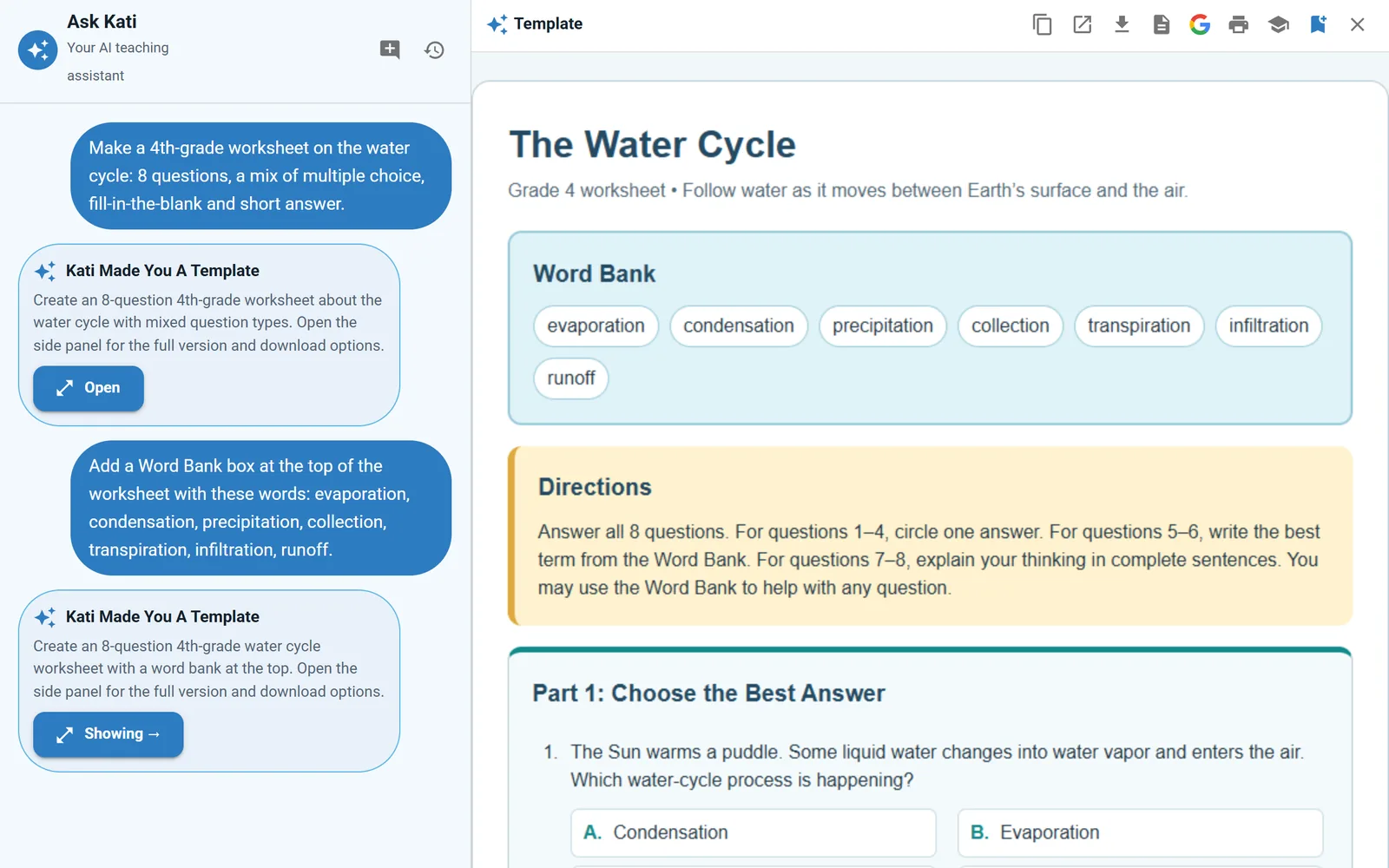
Ask Kati in Skylark: a teacher asks for a 4th-grade water cycle worksheet, then for a word bank, and the finished worksheet opens beside the chat.

The video · 1:20

Meet Skylark in under a minute and a half.

Watch on YouTube

Transcript

What the video says, as recorded in November 2026. Where it differs from the product page, the product page is current.

Meet Skylark, the AI toolkit built for K-12 teachers. Sign in, and Kati asks one question. What are we making today?

Pick a tool. A lesson plan, a unit plan, a worksheet, a multiple choice quiz, an exit ticket, a rubric. More than fifty tools, in seven categories.

Fill in a few fields. Grade level, standard, topic. The finished material comes back in about a minute, formatted and ready to use.

Reading too hard for some of your students? Level the text, scaffold it, or explain it three ways. Write a family email, then translate it. Draft report card comments and a class newsletter.

Ask Kati anything, and pick the conversation up again tomorrow. Every chat is saved.

Open a Room for your class. Choose one of thirty activities. A Socratic tutor, a debate partner, a math practice coach. Share a join code, and students talk with Kati about the lesson. No student accounts needed. You see every transcript.

Everything you make lands in Materials, ready for next year.

Skylark. Lessons, worksheets, quizzes, and family notes, in minutes, with Kati. Skylark, by Skybird.AI.

Sound familiar?

It's 9 p.m., and the list is still growing. Tomorrow's lesson needs a warm-up. Third period needs the same reading at three levels. An IEP progress note is due Friday, and a parent wrote in Spanish to ask about the field trip. None of it is hard. All of it takes time, and the first bell rings at 7:45.

Ask Kati, and get a file you can teach from.

  • Worksheets, quizzes and slide decks you refine in plain English, then download to Word or PowerPoint or save to Google.
  • Level a reading, draft the IEP progress note, write the family email and translate it: each has a tool of its own.

Features

What Skylark does for you.

Ask Kati

Ask in plain English. Get a file you can use.

Kati turns a request like "a 10-question water cycle quiz with an answer key" into a worksheet, quiz or slide deck that opens beside the chat. Ask for changes in your own words, then send it wherever you teach.

  • Three kinds of file. Worksheets and handouts, quizzes, and slide decks, each in an editable side pane.
  • Refine by asking. "Add a word bank at the top." Kati revises the file. Every chat is saved, so you can pick it up again tomorrow.
  • Out the door. Download Word or PowerPoint, save to Google Docs, Slides or Forms, or export a quiz in 12 LMS and quiz formats.
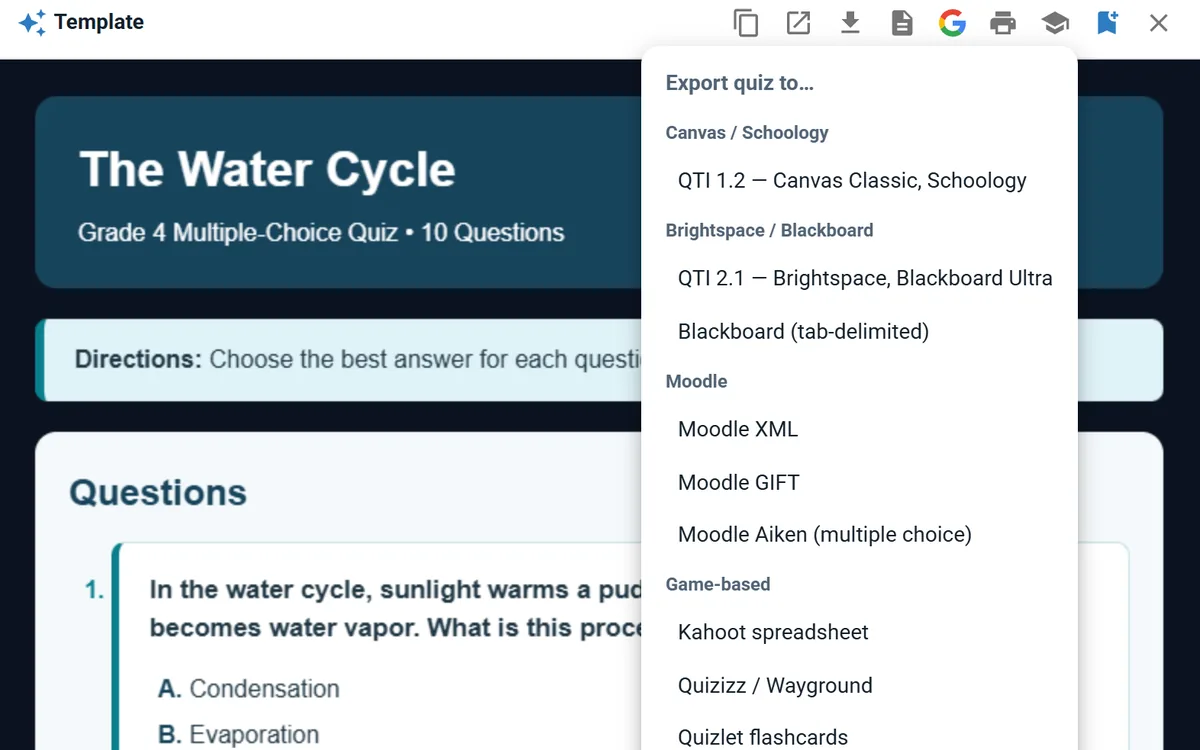
A 4th-grade water cycle quiz from Kati with the Export quiz menu open: Canvas, Schoology, Brightspace, Blackboard, Moodle, Kahoot, Quizizz, Quizlet and more.

50 tools

Fifty tools for the rest of the list, IEPs included.

When you know exactly what you need, pick a tool and fill in a few fields: grade level, topic, standard. Seven categories run from lesson plans and exit tickets to leveled readings and family email, and the special-ed tools turn your notes into IEP, behavior and 504 drafts.

  • Plan and assess. Lesson Plan, Unit Plan, Standards-Aligned Lesson, Exit Ticket, DOK Questions and Rubric.
  • Reach every reader. Reading too hard for some of your students? Level the text, scaffold it, or explain it three ways.
  • Special-ed drafts. IEP goals, present levels, accommodations, progress monitoring, transition plans, BIPs and 504 plans, as drafts you review and finalize (Basic and Premium).
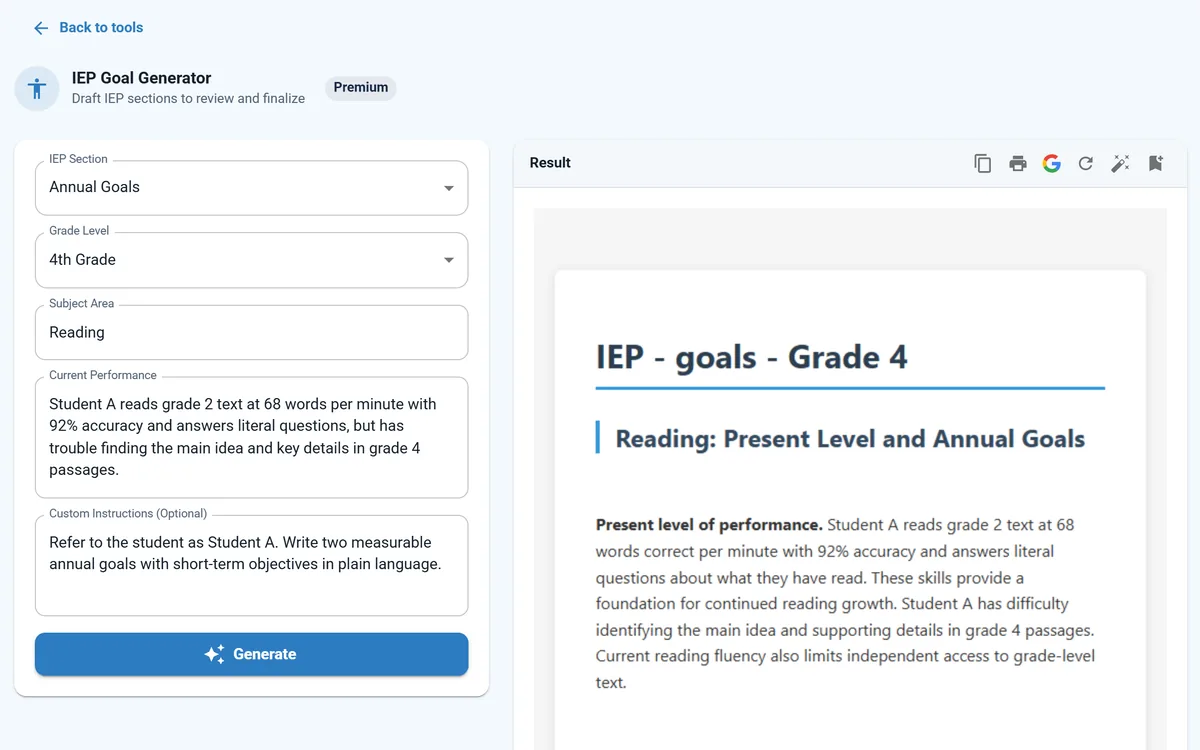
The IEP Goal Generator: notes about a fictional 4th grader called Student A on the left, and a drafted present level and annual reading goals on the right.

Rooms

AI activities your students join with a code.

Open a Room and pick one of 29 activities, from a Socratic tutor to a debate partner to a math practice coach. Share the join code, and students talk with Kati about your topic, no student accounts needed. You see every transcript, and Rooms are on the free plan.

  • 29 ready-made activities. Socratic Tutor, Debate Partner, Historical Roleplay, Reading Buddy, Quiz Me and more.
  • You hold the switch. Turn a room on or off anytime, and read each student's transcript.
  • Help after the bell. 12 tutor tools on the student page guide with questions instead of handing over answers.
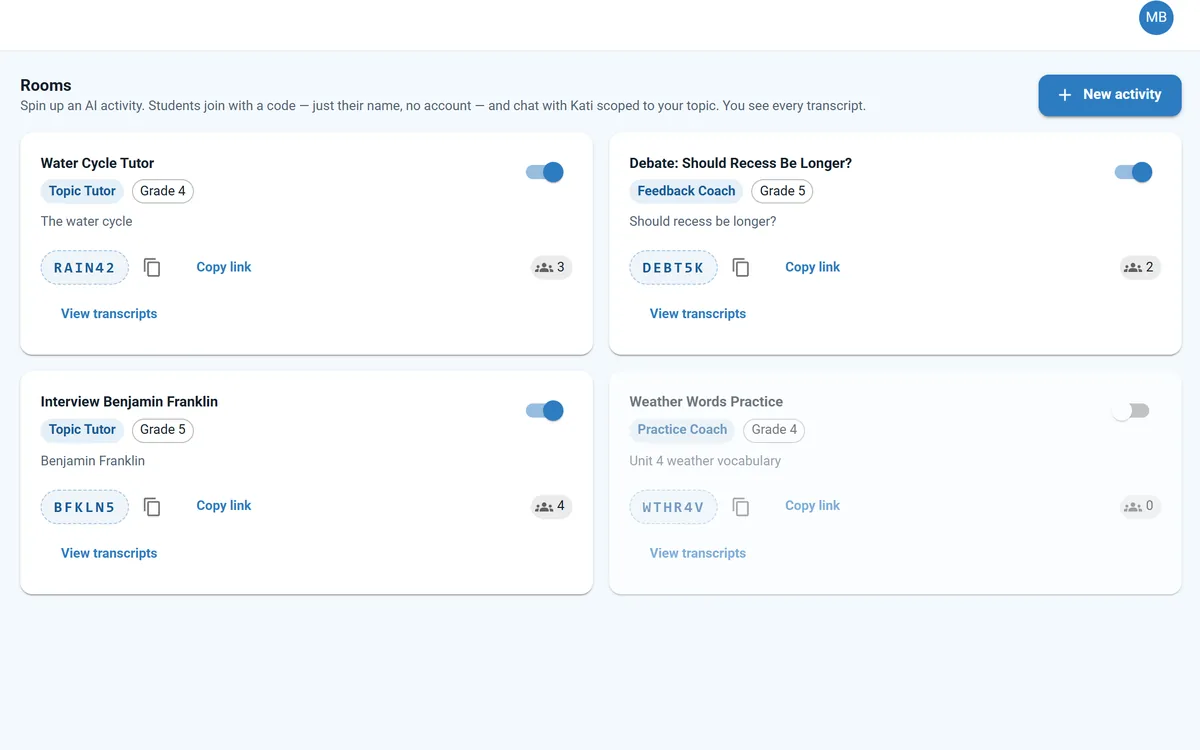
The Rooms page in Skylark: four fictional class activities (Water Cycle Tutor, a recess debate, an interview with Benjamin Franklin and a weather vocabulary practice), each with a join code, an on/off switch and a link to student transcripts.

The full toolkit

Everything inside Skylark.

Seven categories. Open one to see every tool by name.

Lessons & Planning

12 tools
  • Lesson Plan
  • Standards-Aligned Lesson
  • Unit Plan
  • Syllabus
  • Choice Board (UDL)
  • Assignment Scaffolder
  • Real World Connections
  • Standards Unpacker
  • Phonics Passage
  • Spelling Word List
  • AI Image Generator (paid plans)
  • Clip Art Search

Worksheets & Practice

4 tools
  • Worksheet
  • Vocabulary List
  • Math Word Problems
  • Math Spiral Review

Assessments & Quizzes

8 tools
  • Multiple-Choice Quiz
  • Diagnostic Assessment
  • Exit Ticket
  • Rubric
  • DOK Questions
  • Test / Exam
  • Exemplar & Non-Exemplar
  • Writing Feedback

Writing & Literacy

8 tools
  • Reading Passage
  • Writing Prompt
  • Text Leveler
  • Text-Dependent Questions
  • Sentence Starters
  • Text Rewriter
  • Text Summarizer
  • Text Proofreader

Student Supports

7 tools
  • Scaffold a Text
  • Translate
  • Explain It 3 Ways
  • IEP Goal Generator
  • Accommodations
  • 504 Accommodation Plan
  • Behavior Reframe

Communication

7 tools
  • Family Email
  • Report Card Comments
  • Class Newsletter
  • Professional Email
  • Email Responder
  • Thank You Note
  • Difficult Conversations

Admin & Operations

4 tools
  • Teacher Observations
  • PD Session Planner
  • Clear Directions
  • Survey Creator

How it works

Skylark in three steps.

  1. The Ask Kati prompt box with a request for a 4th-grade water cycle worksheet.

    Step 1: Ask Kati or open a tool

    Type what you need in plain English, or pick one of 50 tools when you know exactly what you want.

  2. A follow-up request to add a word bank, and the revised worksheet with the word bank at the top.

    Step 2: Refine the draft

    Ask for changes in your own words, or regenerate. It stays a draft until you decide it is ready.

  3. A finished quiz with the Google menu open: save it as a Google Doc, or as a graded Google Forms quiz with its answer key, in a Skylark folder in Google Drive.

    Step 3: Take it to class

    Download Word or PowerPoint, save to Google, export a quiz to your LMS, or share a Room code with your class.

A teacher's day with Skylark

From the first bell to the note home.

Four ordinary moments where Skylark hands you a first draft. You still make every call.
  1. Free plan

    A warm-up from Kati

    Ask for three quick questions on today's topic and print them before the first bell.

    Sample: Ask Kati · Warm-up

    Three warm-up questions on the water cycle for 4th grade.

    1. Where does a puddle go on a sunny day?
    2. Name one way water gets into the air.
    3. Draw the path of one raindrop.

    Made with Ask Kati

  2. Paid plans

    One passage, three reading levels

    Text Leveler rewrites the same passage up or down for each reading group.

    Sample: One passage, three groups
    • Original Water on Earth is constantly in motion, circulating among the oceans…
    • Grades 4–5 Water on Earth is always on the move, from ocean to air to land.
    • Grades 2–3 Water is always moving between the land, the sky and the ocean.

    Made with Text Leveler

  3. Paid plans

    IEP goals, drafted

    Turn your notes on a student's reading into measurable annual goals for your team to review.

    Sample: Draft · Annual goal 1

    Reading fluency

    Within one year, given an unfamiliar grade 2 passage, Student A will read aloud at least 95 words correct per minute with at least 96% accuracy…

    Draft · review and finalize

    Made with IEP Goal Generator

  4. Paid plans

    A note home, in Spanish

    Family Email writes the field-trip note. Translate puts it in the family's home language.

    Sample: English to Spanish

    Our class field trip to the Maple Hollow Nature Center is on Friday, May 8.

    Nuestra clase irá de excursión al Centro de Naturaleza Maple Hollow el viernes 8 de mayo.

    Made with Family Email and Translate

During classFree plan

Rooms: students join with a code

Students type the join code on the student page and talk with Kati about your topic. No student accounts needed, and you see every transcript.

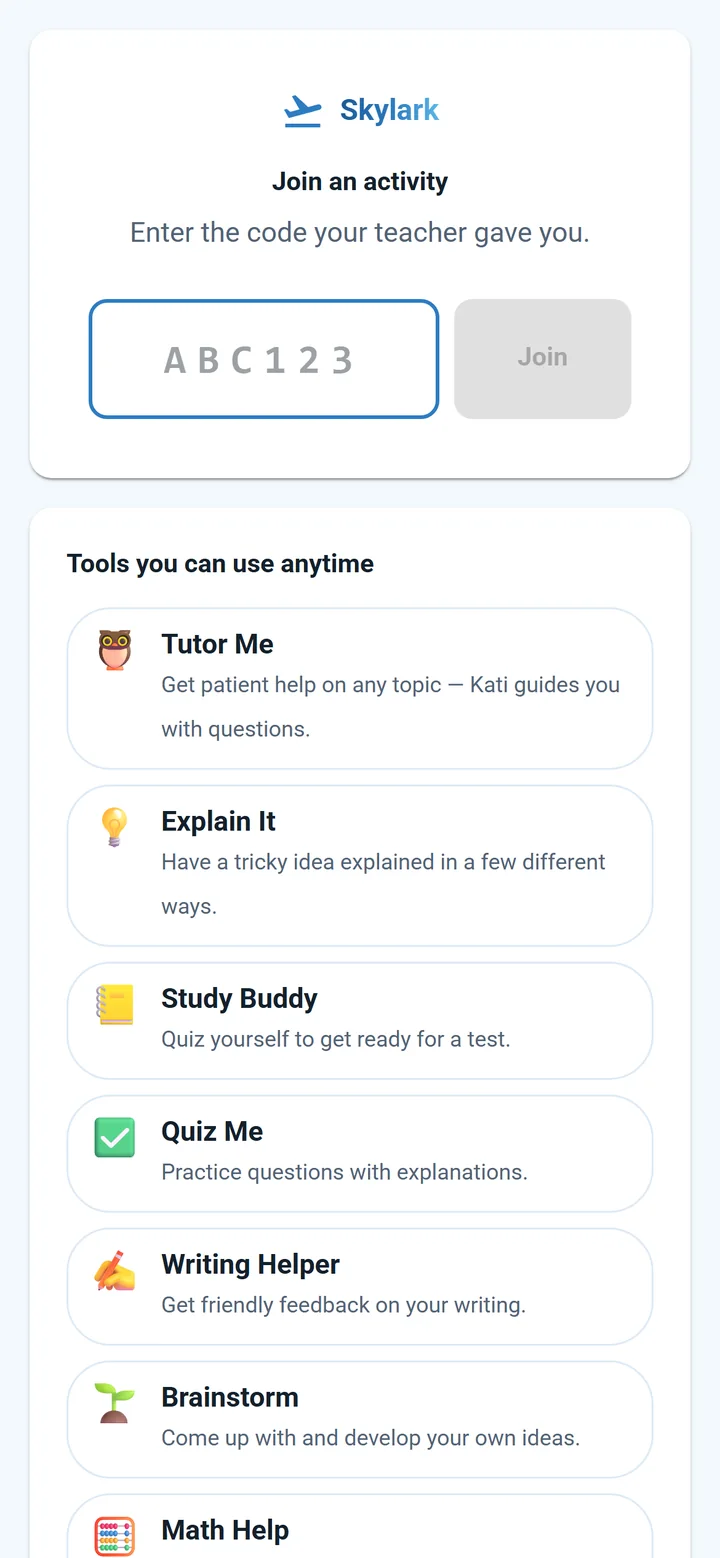
A phone showing the Skylark student page, where a student enters the code their teacher gave them. Beside it, the teacher's transcript list for a Water Cycle Tutor room: Maya, Jordan and Ava. In Maya's conversation, Kati answers her question with a guiding question. Names and code are fictional.

Trust

What you can count on.

  • AI drafts. You decide.

    Kati and the tools write first drafts. You review, edit and decide what reaches your class and your families.

  • You see every transcript.

    Open or close a room whenever you like, and read each student's full conversation with Kati from the Rooms page.

  • Tutors that ask, not tell.

    The Socratic Tutor room and the 12 student tutor tools are set up to guide with questions instead of handing over answers.

Read the privacy policy:Skylark privacy policy (opens in new tab)

Works with

  • Microsoft Word
  • PowerPoint
  • Google Docs
  • Google Slides
  • Google Forms
  • Google Classroom
  • Canvas
  • Schoology
  • Brightspace
  • Blackboard
  • Moodle
  • Kahoot
  • Quizizz
  • Quizlet

Pricing

Start free. Upgrade when you need more.

  • Free

    $0/mo

    Kati, the core tools and Rooms.

    • Kati on the free model
    • 14 core tools: lessons, worksheets, quizzes and more
    • Rooms: student activities by join code
    • Save favorites to My Materials
    Start free
  • Basic

    $9.99/mo

    Every tool, including special-ed drafting.

    • Everything in Free
    • Every tool, on premium AI models
    • Document upload and analysis
    • AI images for slides and handouts
    • 1,000 credits a month
    Start free
  • Premium

    $29.99/mo

    For heavy use and busy departments.

    • Everything in Basic
    • 5,000 credits a month
    • Highest usage limits
    • Priority support
    • Early access to new tools
    Start free

One account works across Skylark, GradAssist and Homeschool Hero. Free-plan tools never use credits. Cancel anytime.

FAQ

Questions, answered.

Still curious? Talk to us

Who is Skylark for?

K-12 classroom teachers, special-education teachers and case managers, and instructional coaches. Students take part only through Rooms codes and the student page, and they never need an account.

If you teach college or university courses, GradAssist is built for you. If you used Power Teacher, it is now Skylark, and one account works across Skylark, GradAssist and Homeschool Hero.

Is there a free plan?

Yes. The free plan includes Kati on the free model, 14 core tools, Rooms and My Materials, and free-plan tools never use credits.

Basic ($9.99 a month) unlocks every tool on premium AI models, plus document upload and 1,000 credits a month. Premium ($29.99 a month) adds 5,000 credits, the highest limits and priority support. You can cancel anytime, keep access to the end of the billing period, and then return to the free plan.

Do my students need accounts?

No. Create a Room and share the join code. Students join with just their name, no account, and it costs them nothing. The student page at gradassist.ai/app/s also has 12 tutor tools they can use anytime.

What can students do in a Room?

Talk with Kati about the topic you set, in one of 29 ready-made activities: Socratic Tutor, Concept Explainer, Reading Buddy, Vocabulary Practice, Quiz Me, Math Practice Coach, Writing Feedback Coach, Debate Partner, Brainstorm Buddy, Project Planner, Historical Roleplay, Exit Ticket Interview, Flashcard Quizzer, Spelling Coach, Grammar Coach, Science Lab Helper, Language Practice Partner, Reading Comprehension Coach, Peer Review Partner, Test Prep Coach, Word Problem Helper, Creative Writing Partner, Current Events Discussion, Argument Builder, Concept Check, Presentation Coach, Research Question Helper, Note-Taking Coach and Analogy Maker.

Each Room keeps a transcript for every student. You can read them all from the Rooms page and turn a room on or off at any time.

Outside class, the student page has 12 tutor tools: Tutor Me, Explain It, Study Buddy, Quiz Me, Writing Helper, Brainstorm, Math Help, Vocab Builder, Understand a Text, Debate a Topic, Essay Planner and Read With Me.

Does Skylark write IEPs?

It drafts them. The IEP Goal Generator covers annual goals, present levels, accommodations, progress monitoring, transition plans and behavior intervention plans, and there are separate 504 Accommodation Plan and Behavior Reframe tools.

Everything arrives as a draft for you and your team to review, edit and finalize. These tools are on the Basic and Premium plans.

Will it work with my standards?

Name your standard and Kati builds to it. The Standards-Aligned Lesson tool builds a lesson to the standards you pick, with an optional quiz and choice board, and Standards Unpacker breaks a standard into teachable parts.

Where can my files go?

From Ask Kati you can download Word or PowerPoint, save to Google Docs, Slides or a graded Google Form, share to Google Classroom, or export a quiz in 12 formats for Canvas, Schoology, Brightspace, Blackboard, Moodle, Respondus, Kahoot, Quizizz and Quizlet. Tool results can be copied, printed, saved or sent to Google.

What happens when I need a substitute?

SubAssist, our substitute-coverage workflow, runs on the same Skybird account. Today you open it from the GradAssist app at gradassist.ai, under More, then SubAssist. Press Report Absence and it copies your most recent class schedule into a sub plan, publishes it and creates an access code. The substitute opens the plan with that code from any device, with no account, and sees only published plans. Plans export to Word.

Your administrators see every absence and who is covering it. That side of SubAssist is part of Power Administrator.

Plan it. Ask Kati. Teach it.

Start free

Bringing Skylark to your school? Talk to us