GradAssist · For college & university instructors

Feedback in the margins. In your voice.

GradAssist reads each paper against your instructions and adds real Word margin comments signed with your name, plus a suggested score you approve.
Start free (opens in new tab)

Free plan · No credit card

Teaching K-12? Meet Skylark
  • Real Word margin comments
  • You approve every grade
  • Exports to 12 LMS & quiz formats
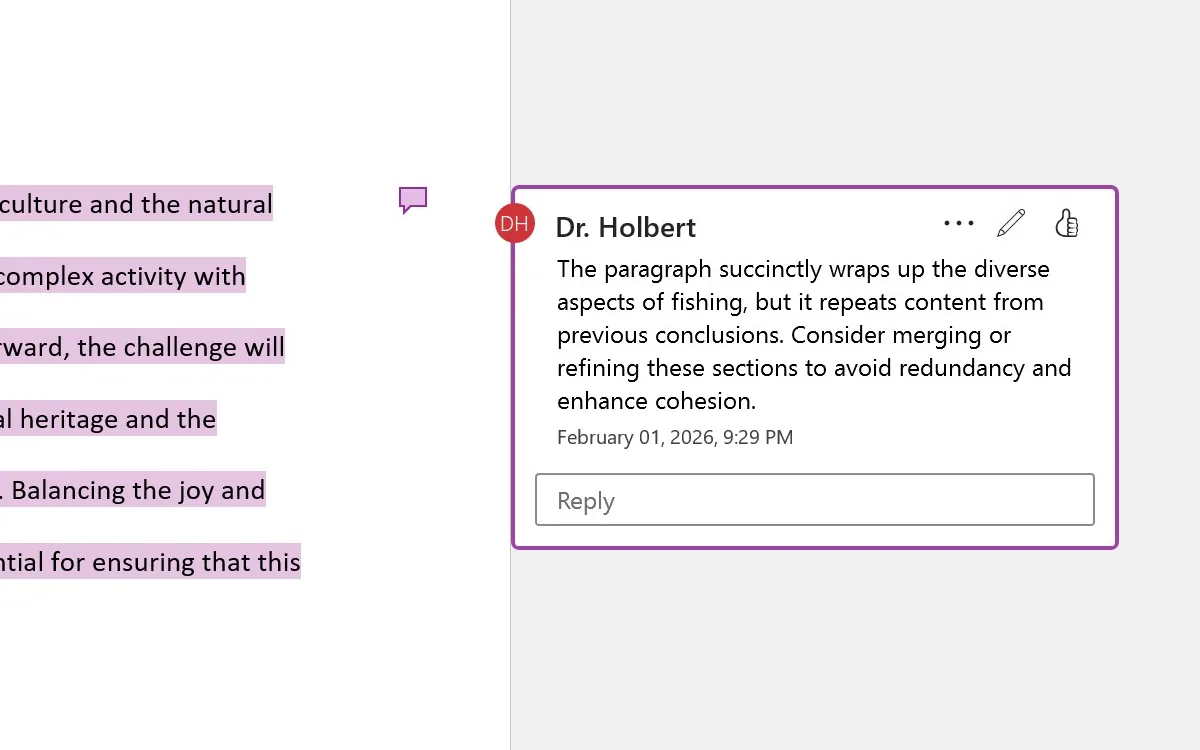
A student's essay open in Word after GradAssist, with margin comments signed Dr. Holbert beside the highlighted lines (sample essay)

The video · 1:31

Meet GradAssist in about a minute and a half.

Watch on YouTube

Transcript

What the video says, as recorded in November 2026. Where it differs from the product page, the product page is current.

Meet GradAssist, the AI assistant that gives college instructors their weekends back. Upload a stack of student papers, and GradAssist reads every one.

Each paper comes back as a Word document with comments in the margin, right where the writing needs work, and an overall evaluation against your rubric. What takes twenty minutes by hand is done in about two.

Paste a student’s work and your rubric, and the evaluation appears beside it, criterion by criterion, with the reasons. GradAssist drafts the feedback. You decide the grade.

Need course materials? Pick a template. A syllabus, an exam, a rubric, a quiz, a study guide, a letter of recommendation. Fill in a few fields, and a finished, formatted document comes back.

Or just describe what you want. GradAssist writes it, and it can build a slide deck, or a complete course shell for your learning management system.

Everything exports to Word, PowerPoint, or Google Workspace, and it looks the way you made it.

Ask Kati, your teaching assistant, anything about your course. And when you need a discussion prompt, a real world example, or a careful email to a struggling student, there is a template for that too.

Everything you make is saved in your library, ready for next term.

GradAssist runs on the best models available, and the free tier gets you started today. Grade faster. Teach more. GradAssist.

Sound familiar?

It's Sunday night: 62 research papers, feedback due Monday. The first ten get real notes in the margins. By paper 40 the comments are getting shorter, the rubric is open in another tab, and the coffee went cold an hour ago. On Tuesday most students will look at the grade and never find the one comment that would have helped.

GradAssist drafts the feedback. You decide the grade.

  • Comments land in the margins of the student's own Word file, right next to the words they're about.
  • Every comment and every score is a draft until you approve it.

Features

What GradAssist does for you.

In the margins

Comments where students actually read them.

Upload one paper or, on a paid plan, the whole stack. Each paper comes back as a Word document with comments in the margin, right where the writing needs work, plus an overall evaluation and a suggested score.

  • Their file, not a report. Comments sit beside the paragraph they're about, in the student's own .docx. PDFs are converted to Word first.
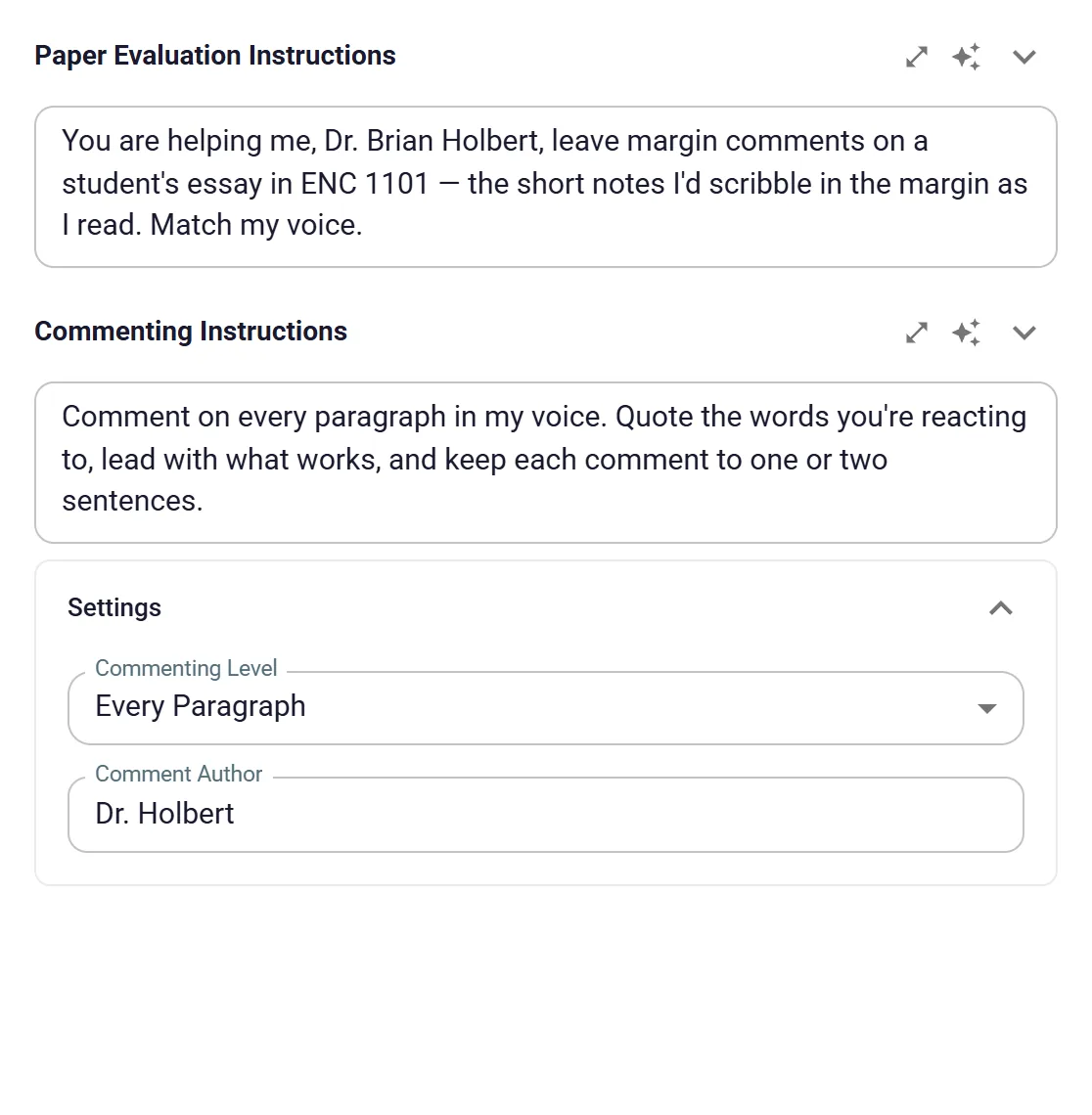
  • Your density, your name. Choose sparse, heavy or every paragraph, and set the name each comment is signed with.
  • The whole stack. On Basic and Premium, upload a class set or one ZIP file and every paper comes back commented.
A real Word margin comment signed Dr. Holbert beside a highlighted conclusion paragraph, suggesting the student merge repeated points

Your voice, saved

Write your standard once. Use it on every paper.

Save evaluation instructions and rubrics for each course, in the words you use with students. Load one with a click, or type “/” in Ask Kati, your teaching assistant, to reuse a prompt you saved.

  • Organized by course. Saved instructions sit in a sidebar grouped by course code, ready for the next stack.
  • Rubrics on your scale. Rubric Designer drafts criteria and levels on a 4-point, 5-point, 100-point or letter scale, aligned to your outcomes.
  • Any assignment type. Essays, lab reports, code or discussion posts: your instructions set the standard.
GradAssist Upload Document settings: paper instructions written in Dr. Holbert's voice, commenting level Every Paragraph, comment author Dr. Holbert

The whole course

Need course materials? Pick a template.

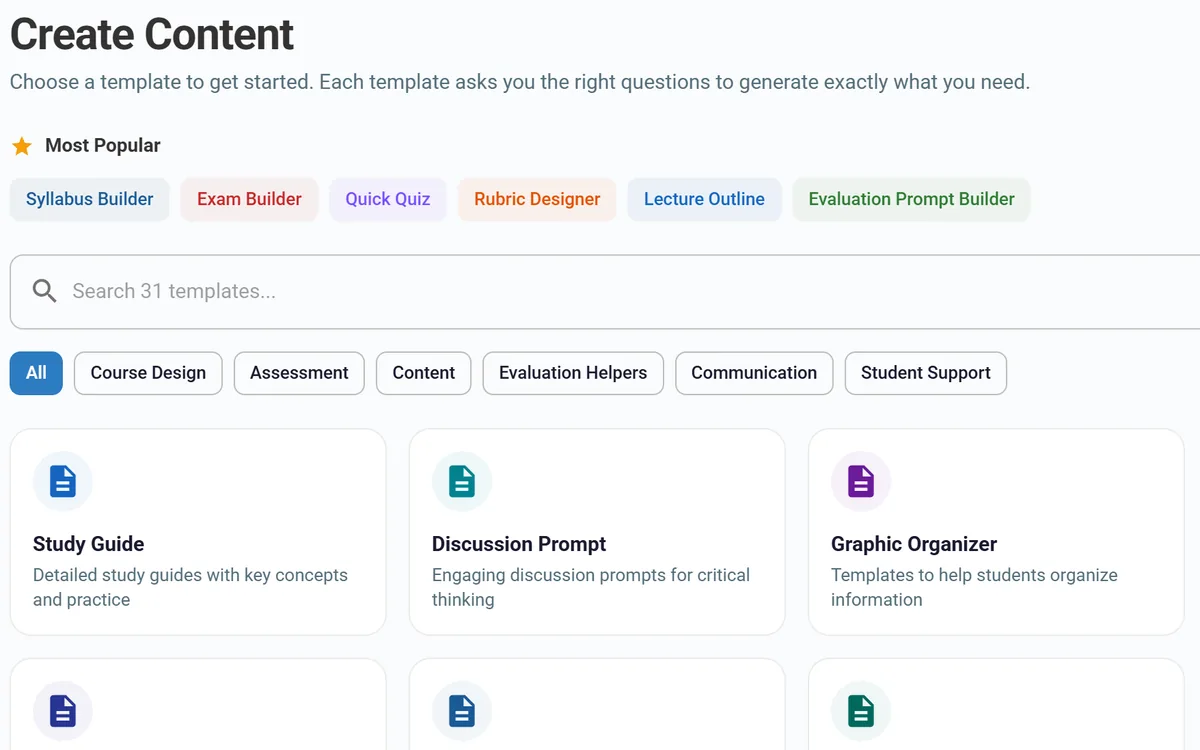
Choose from 31 templates, from a syllabus, an exam or a rubric to a quiz, a study guide or a letter of recommendation. Fill in a few fields, and a finished, formatted document comes back. Or just describe what you want in Ask Kati.

  • Slide decks and course shells. Build a PowerPoint deck, or a Canvas course shell (.imscc) with dated modules, assignments with rubrics and graded discussions.
  • Exports that keep their look. Save to Word, PowerPoint, Google Docs, Slides or a graded Google Form. Quizzes export in 12 LMS and quiz formats.
  • Ready for next term. Save what you make to your library and pick it up again when the course comes around.
GradAssist Create Content screen with a search box for 31 templates, category filters and template cards

The full toolkit

Everything inside GradAssist.

Seven categories. Open one to see every tool by name.

Feedback & grading

12 tools
  • Word margin comments
  • Batch evaluation
  • ZIP evaluation
  • Evaluate Assignment
  • Image evaluation
  • Increase Accuracy
  • Grade with Rubric
  • Discussion Evaluation
  • Reply to Discussion
  • Evaluation Prompt Builder
  • Feedback Template
  • Document Commenting Guide

Course design & assessment

13 tools
  • Syllabus Builder
  • Course Schedule
  • Learning Outcomes
  • Module / Unit Plan
  • Canvas course shell (.imscc)
  • Exam Builder
  • Quick Quiz
  • Rubric Designer
  • Assignment Brief
  • Group Project
  • Peer Review Criteria
  • Discussion Prompts
  • Document & course analysis

Lectures & study materials

10 tools
  • Lecture Outline
  • Slide decks (PowerPoint)
  • Reading Guide
  • Study Guide
  • Case Study Builder
  • Discussion Prompt
  • Graphic Organizer
  • Office Hours Prep
  • AI Image Generator
  • Clip Art Search

Communication & student support

6 tools
  • Course Announcement
  • Email to Student
  • Recommendation Letter
  • Assignment Scaffold
  • Accommodation Response
  • Student Progress Note

Ask Kati & your library

5 tools
  • Ask Kati chat
  • “/” saved prompts
  • Saved instructions by course
  • Library
  • Teacher community

Quiz export formats

12 formats
  • QTI 1.2 (Canvas Classic, Schoology)
  • QTI 2.1 (Brightspace, Blackboard Ultra)
  • Moodle XML
  • GIFT
  • Aiken
  • Blackboard tab-delimited
  • Respondus
  • Kahoot
  • Quizizz / Wayground
  • Quizlet
  • Generic CSV
  • Google Forms

Save & share

5 destinations
  • Word (.docx)
  • PowerPoint (.pptx)
  • Google Docs
  • Google Slides
  • Share to Google Classroom

How it works

GradAssist in four steps.

  1. A saved instruction, ENC 1101 · Margin Comments, selected in the Saved Instructions list

    Step 1: Set your standard

    Write or load your instructions and rubric for the course. Save them once and reuse them all term.

  2. Upload Document with the ZIP Eval tab open and a ZIP of narrative essays selected

    Step 2: Upload the papers

    Add one Word file or PDF, or a whole class set as a batch or ZIP on a paid plan.

  3. A highlighted sentence in the essay with a margin comment from Dr. Holbert

    Step 3: Review the draft

    Read the margin comments, the summary and the suggested score. Change anything you want.

  4. Document Ready with the commented file name and a Download button

    Step 4: Return it

    Download the commented .docx and hand it back with the grade you decide.

From paper to feedback

Two things in. One commented paper out.

GradAssist reads the student’s paper against your instructions, then hands back the same Word file with comments in the margins, an overall summary and a suggested score for you to approve.
  1. Step 1: In

    The student’s paper

    A .docx, .doc or PDF. PDFs are converted to Word, so the comments can sit in the margins.

  2. Step 2: In

    Your instructions or rubric

    Saved once per course, in your words. You choose how densely to comment and whose name signs each note.

  3. Step 3: Out

    Margin comments, a summary and a suggested score

    The same Word file comes back with comments signed with your name. You read it, change what you want and decide the grade.

Works for any assignment type with your instructions: essays, lab reports, code and discussion posts.

Trust

What you can count on.

  • AI drafts. You decide.

    GradAssist drafts comments, a summary and a suggested score. You read them, change what you want and decide the grade. Nothing reaches a student until you return it.

Read the privacy policy:GradAssist privacy policy (opens in new tab)

Works with

  • Microsoft Word
  • PowerPoint
  • Canvas
  • Brightspace
  • Blackboard
  • Moodle
  • Schoology
  • Respondus
  • Kahoot
  • Quizizz
  • Quizlet
  • Google Docs
  • Google Slides
  • Google Forms
  • Google Classroom

Pricing

Start free. Upgrade when you need more.

  • Free

    $0/mo

    Try it on real papers.

    • Built-in free AI model
    • Documents up to 3 pages
    • Basic content generation
    • 500 credits
    Start free
  • Basic

    $9.99/mo

    For a full teaching load.

    • Premium AI models
    • Documents up to 10 pages
    • Batch and ZIP evaluation
    • Image evaluation and generation
    • 1,000 credits a month
    Choose Basic
  • Premium

    $29.99/mo

    For long papers and big sections.

    • Everything in Basic
    • Documents up to 100 pages
    • 5,000 credits a month
    • Priority support
    Choose Premium

One account and one plan cover GradAssist, Skylark and Homeschool Hero. Cancel anytime; your plan runs to the end of the billing period.

FAQ

Questions, answered.

Still curious? Talk to us

Who is GradAssist for?

College and university instructors, including adjuncts and online faculty with big grading loads, and anyone who builds college courses. If you teach K-12, Skylark is the Skybird.AI product built for you.

Does GradAssist grade for me?

No. It drafts margin comments, an overall summary and a suggested score from your instructions. You read them, change what you want and decide the grade. Nothing goes back to a student until you return it.

What files can I upload?

Word files (.docx and .doc), PDFs and text files. PDFs are converted to Word so the comments can sit in the margins. Free handles documents up to 3 pages, Basic up to 10 and Premium up to 100. On Basic and Premium you can upload a whole class set as a batch or one ZIP, and each paper comes back with its own margin comments.

How does the feedback end up sounding like me?

It starts from your instructions. Save them once per course with your rubric, choose how densely to comment, and set the name each comment is signed with. In Ask Kati, type “/” to reuse a prompt you wrote in your own words.

What does Increase Accuracy do?

It is a built-in second check on Evaluate Assignment: one switch in Settings, and it adds a few seconds. After the feedback is written, it is checked against the student’s work and rewritten if it says something is missing that the paper actually covers.

An Accuracy check panel shows the original claim and the line from the paper that contradicts it, and the corrected feedback still comes to you as a draft, like everything else.

Can it help me build the course, too?

Yes. Pick one of 31 templates, such as a syllabus, an exam, a rubric, a quiz, a study guide or a letter of recommendation, fill in a few fields and a formatted document comes back. Or describe what you want in Ask Kati. GradAssist can also build a PowerPoint deck or a Canvas course shell, and you can save what you make to your library for next term.

Will it work with my LMS?

Quizzes export in 12 formats, including QTI for Canvas, Schoology, Brightspace and Blackboard, plus Moodle XML, Respondus, Kahoot, Quizizz and Quizlet. GradAssist can also build a Canvas course shell (.imscc) with dated modules, assignments and graded discussions, and save to Google Docs, Slides or a graded Google Form.

What does it cost?

Free is $0 and needs no credit card. Basic is $9.99 a month and Premium is $29.99 a month. One account and one plan also cover Skylark and Homeschool Hero, and you can cancel anytime.

Read it. Comment it. Return it.

Start free (opens in new tab)

Bringing GradAssist to your department? Talk to us