Homeschool Hero · For homeschool families, PreK–12

Your whole week, planned before Sunday night.

Homeschool Hero drafts a lesson for every child, subject and school day, matched to each child's level and your teaching philosophy, then helps you keep the records.

Free to start: records and compliance tools. AI planning from $9.99/mo.

Kids: student sign-in (opens in new tab)
  • 9 teaching philosophies
  • Step-by-step guides for 10 states
  • Multi-child, PreK–12
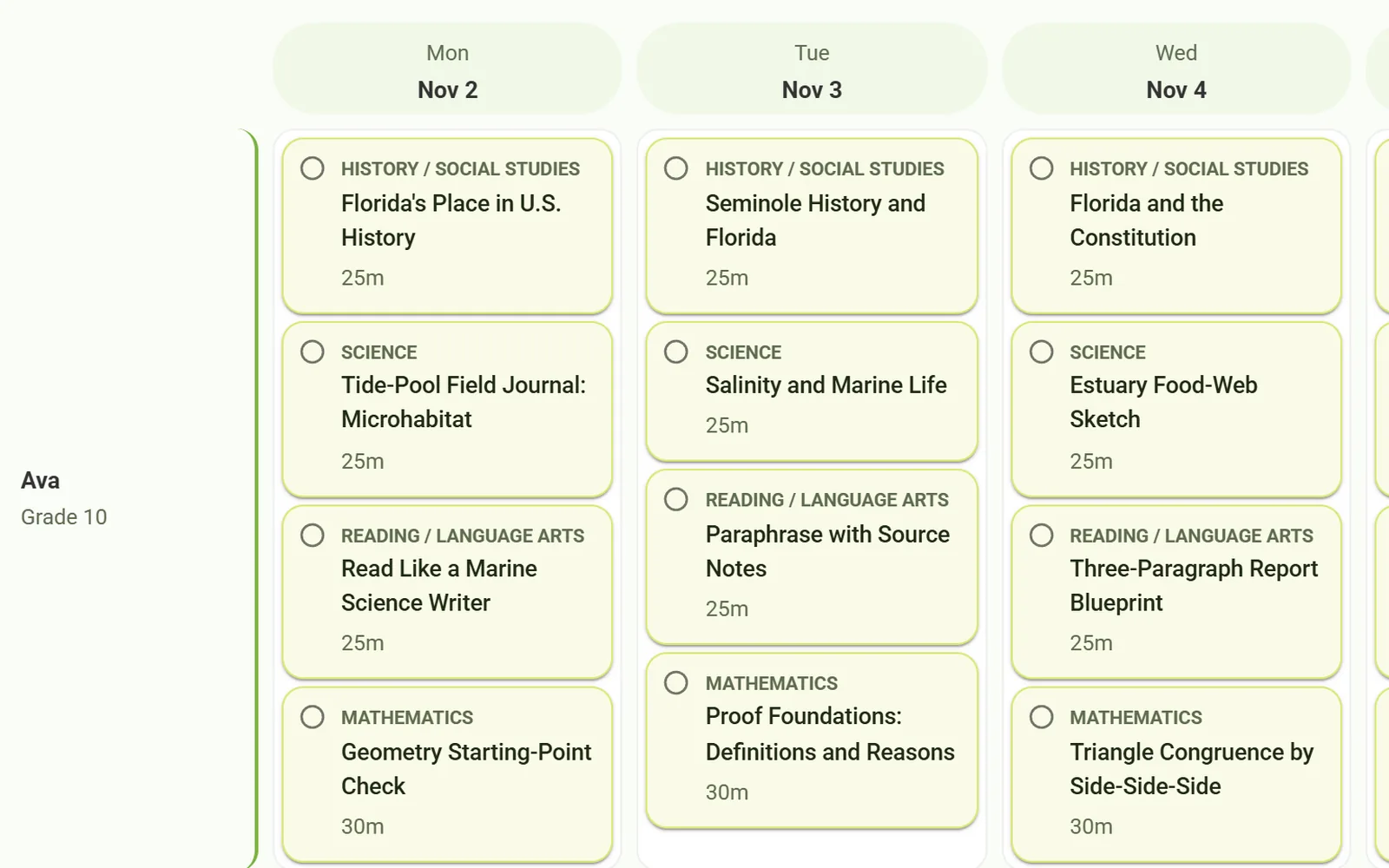
Homeschool Hero's week view: Monday to Wednesday lessons in history, science, reading and math planned for Ava, grade 10.

Sound familiar?

It's Sunday night. The kitchen table holds a second-grade reader, a sixth-grade fractions book and a tenth-grade geometry text. You need five days of lessons for each of them, a week of hours to log, and an answer to the question that never quite goes away: are they behind? By the time the plan is done, so is the weekend.

Plan the week in minutes. Keep the records as you go.

  • Lessons matched to each child's level and interests, in the way your family teaches.
  • Portfolio descriptions, reports and transcript course descriptions, drafted for you to review.

Features

What Homeschool Hero does for you.

Plan my whole week

One click plans every child, every subject, every day.

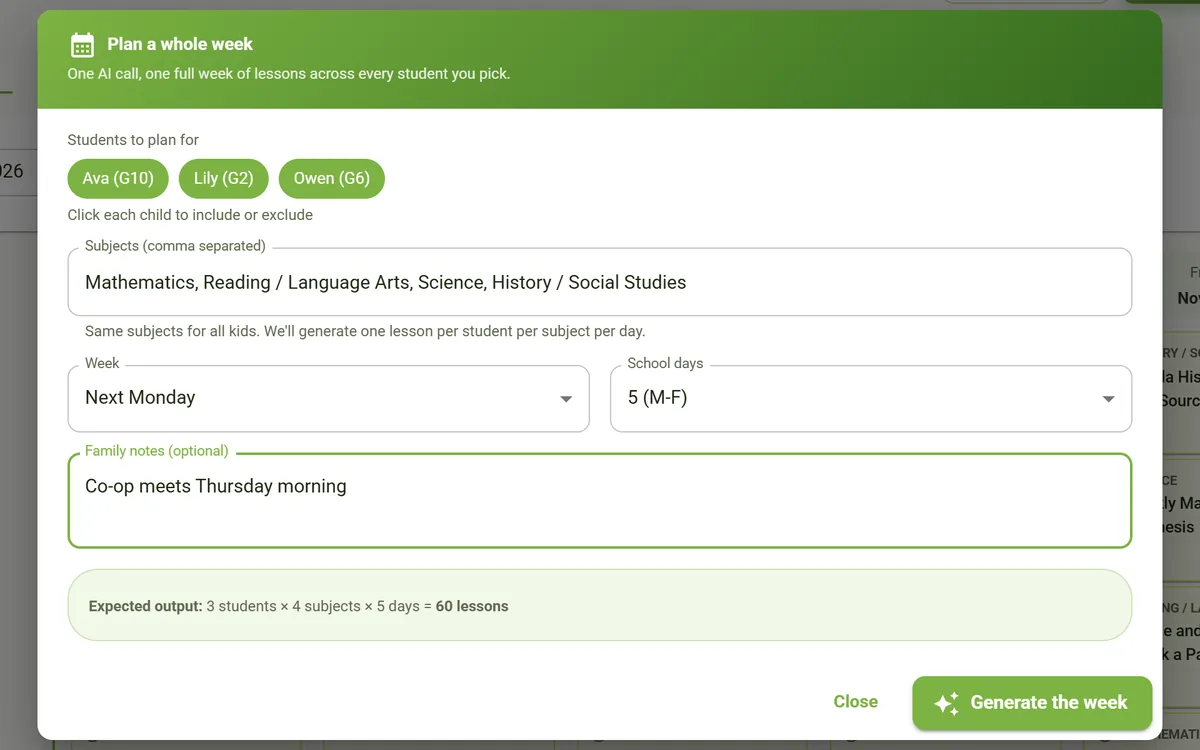
Choose the week, the school days, the children and the subjects. Add a note like "Co-op meets Thursday morning" and Homeschool Hero drafts the whole week in minutes, then saves each lesson to your week view.

  • Works around your week. Mention a co-op morning or a field-trip day and the plan works around it.
  • Ready to teach. Each lesson comes with objectives, materials, activities and a quick check for understanding.
  • Go deeper on any day. Open a lesson and regenerate it in full detail.
The "Plan a whole week" dialog with Ava, Lily and Owen selected, four subjects, five school days, and the family note "Co-op meets Thursday morning".

Fits each child

Lessons that start where each child actually is.

Each child's profile holds their grade, learning style, interests and learning needs, plus your notes on where they are now. Every lesson, quiz and week plan reads it, so three kids at three levels get three different plans.

  • PreK through 12. One family, any mix of grade levels.
  • Placement diagnostic. Starting mid-year or coming home from school? A leveled check, from prerequisites to one grade above, shows where to start.
  • Builds on their progress. Update what they've mastered and what they're working on, and the next plan builds on it.
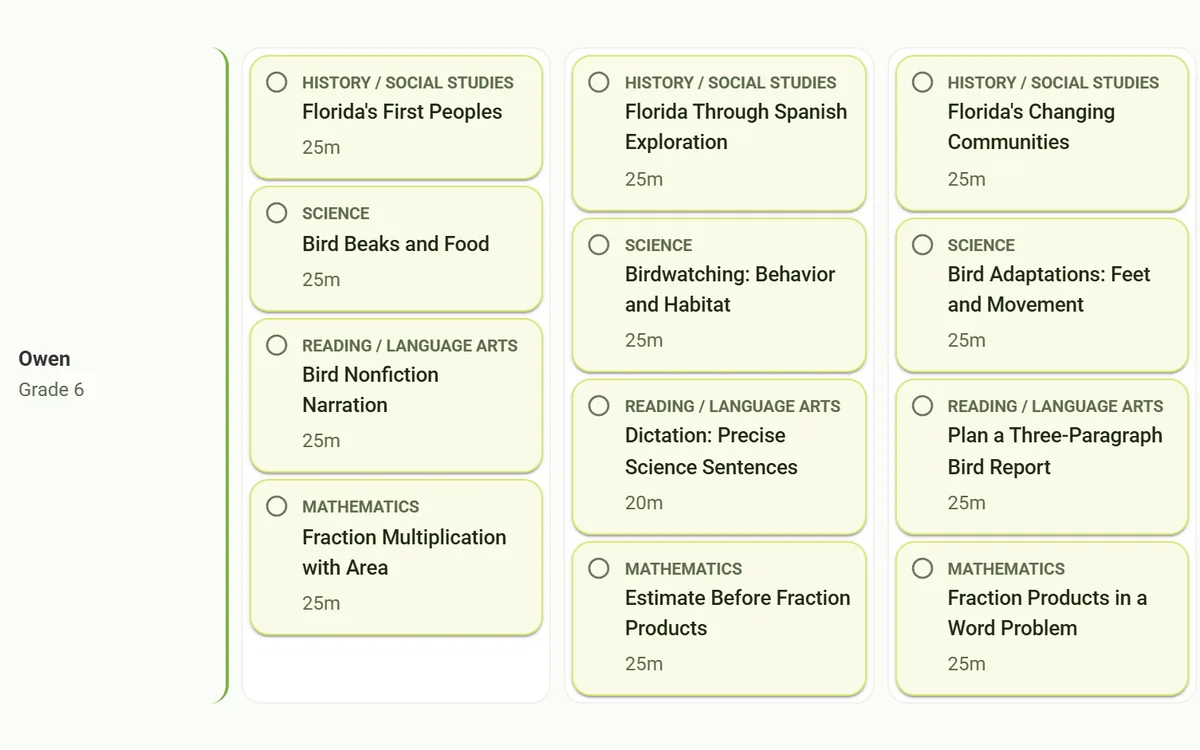
Owen's planned week, grade 6: bird-themed science and reading lessons, Florida history, and fraction multiplication in math.

Records that write themselves

The paperwork keeps up with the teaching.

Log hours by subject in seconds. Write a couple of sentences about a project and Homeschool Hero turns them into a portfolio description, ready for an evaluator.

  • Reports, drafted. Quarterly, mid-year and annual reports, written from the hours, subjects and progress you logged.
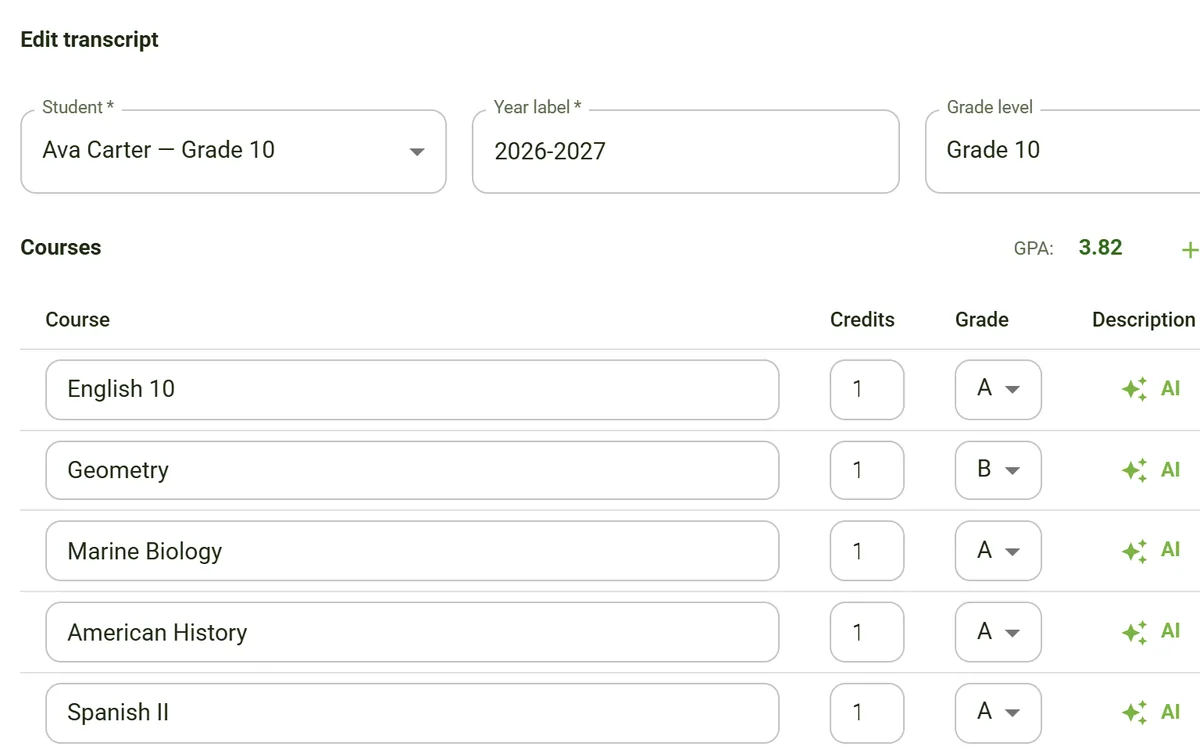
  • High-school transcripts. Courses, credits and grades with an automatic GPA, plus AI-written course descriptions.
  • Student portal on Premium. Kids sign in with a private link and get instant grading and feedback. Results land in their portfolio, and hours log themselves.
Editing Ava's grade 10 transcript: five courses with credits and grades, an AI button for each course description, and a calculated GPA of 3.82.

The full toolkit

Everything inside Homeschool Hero.

Four categories. Open one to see every tool by name.

Planning & lessons

7 tools
  • Plan my whole week
  • Lesson Plan
  • Year Plan (scope & sequence)
  • Worksheet
  • Quiz / Test with answer key
  • Reading List
  • Library

Where each child stands

4 tools
  • Child profiles
  • Placement diagnostic
  • Placement summary
  • Assessment log & score history

Records & state paperwork

7 tools
  • State checklists (10 states in detail)
  • Quarterly, mid-year & annual reports
  • Attendance & hours
  • Portfolio
  • Portfolio descriptions
  • Transcripts with automatic GPA
  • Transcript course descriptions

Kati & the student portal

4 tools
  • Kati, your planning co-pilot
  • Student portal (Premium)
  • Instant grading & feedback (Premium)
  • Parent activity feed (Premium)

How it works

Homeschool Hero in four steps.

  1. Family settings: The Carter Family, Florida, Charlotte Mason.

    Step 1: Set up your family

    Choose your state and your teaching philosophy. Homeschool Hero uses both whenever it plans.

  2. Three child profiles: Lily, grade 2; Owen, grade 6; Ava, grade 10.

    Step 2: Add each child

    Grade, learning style, interests and where they are now. Not sure where to start? Run a placement diagnostic.

  3. A week of lessons for three children, Monday to Friday.

    Step 3: Plan the week

    Click Plan my week, choose the days, children and subjects, add family notes and generate. Open any lesson to go deeper.

  4. Attendance for the last 30 days and a portfolio description, drafted.

    Step 4: Teach, then log it

    Mark lessons done, log hours and add work samples. Reports and portfolio descriptions draft from what you've logged.

Made for your family

Your philosophy. Your state.

Homeschool Hero plans around how your family teaches and where you live. Try both.

Pick a philosophy. Watch the lesson change.

Same child, same topic: Owen, grade 6, who loves birds, learning how birds fly.

Teaching philosophy for the sample lesson
Science · Owen, grade 635 min

Eclectic sample lesson: How Birds Fly

  1. 0–10A short explanation of the four forces of flight.
  2. 10–25Hands-on: fold and test two paper gliders.
  3. 25–32Talk it over: which glider flew more like a bird, and why?
  4. 32–35A quick labeled sketch to wrap up.

Materials Paper, ruler, pencil

Eclectic: Mix and match: use what works for each child and subject.

Science · Owen, grade 630 min

Classical sample lesson: The Four Forces of Flight

  1. 0–5Memory work: lift, weight, thrust and drag.
  2. 5–15Primary source: an aviator's notes on how birds balance.
  3. 15–25Socratic questions: why can't people fly by flapping?
  4. 25–30Write a two-sentence argument using one force.

Materials Primary-source excerpt, notebook

Classical: Trivium-based: grammar, logic, rhetoric. Great books, primary sources, memorization.

Science · Owen, grade 620 min

Charlotte Mason sample lesson: Wings at the Window

  1. 0–5Read a few pages from a living book about birds.
  2. 5–9Owen narrates the reading back in his own words.
  3. 9–17Nature study: watch a backyard bird and sketch its wings.
  4. 17–20Copywork: one sentence from today's reading.

Materials A living book about birds, nature journal, pencil

Charlotte Mason: Short lessons, living books, narration, nature study, copywork.

Science · Owen, grade 645 min

Montessori sample lesson: Build a Wing

  1. 0–5Compare a real feather with a paper wing.
  2. 5–35Work period: Owen builds three wings and tests them at a fan.
  3. 35–40He records which shape glides farthest.
  4. 40–45Concrete to abstract: sketch how air moves over a wing.

Materials Feather, card stock, scissors, tape, a fan

Montessori: Hands-on materials, self-directed work, concrete-to-abstract progression.

Science · Owen, grade 640 min

Traditional sample lesson: Lesson 4: How Birds Fly

  1. 0–5Objective: name the four forces and explain lift.
  2. 5–20Direct instruction: read the section and label the diagram.
  3. 20–35Practice: six workbook questions.
  4. 35–40Check for understanding: a three-question exit quiz.

Materials Science textbook, workbook, pencil

Traditional: Textbook and workbook with clear objectives and structured instruction.

Science · Owen, grade 645 min

Unit Study sample lesson: Birds and Flight, Day 2

  1. 0–10Science: how the shape of a wing creates lift.
  2. 10–20History: how birds inspired the first airplane builders.
  3. 20–30Literature: read a bird poem aloud and talk about its images.
  4. 30–45Art: draw a bird in flight and label the forces.

Materials Unit book basket, sketch paper, colored pencils

Unit Study: Theme-based learning integrating multiple subjects around a topic.

Science · Owen, grade 6Open-ended

Unschooling sample lesson: How Do Birds Land?

  1. StartBegin with the question Owen asked at the bird feeder.
  2. ExploreFilm birds landing and watch in slow motion together.
  3. Dig inLook up how birds use their wings and tails as brakes.
  4. MakeOwen chooses what to make with what he found.

Materials A phone camera, the bird feeder, library books

Unschooling: Child-led learning driven by curiosity and real-world experiences.

Science · Owen, grade 640 min

Waldorf sample lesson: The Swift's Long Journey

  1. 0–10Story: the tale of a swift flying south for the winter.
  2. 10–20Form drawing: the long, curving path of a gliding bird.
  3. 20–35Watercolor: paint the sky the swift crossed.
  4. 35–40Main lesson book: copy and illustrate today's summary.

Materials Watercolors, block crayons, main lesson book

Waldorf: Rhythm, story-based learning, artistic integration, developmentally timed.

Science · Owen, grade 635 min

Faith-based sample lesson: Wings and Wonder

  1. 0–5An opening reflection, in your family's tradition.
  2. 5–20Direct instruction: the four forces of flight.
  3. 20–30Practice: label a bird diagram.
  4. 30–35A closing reflection and a short journal entry.

Materials Devotional reading of your choice, diagram, notebook

Faith-based: Traditional academic structure with integrated faith perspective.

Sample lessons, written to show how each approach shapes a plan. Homeschool Hero drafts yours from your own children’s profiles.

Find your state.

Step-by-step guides cover the 10 states in green. Every other state gets general guidance.

Choose your state
  • Detailed guide
  • General guidance

FloridaDetailed guide

Homeschool Hero has a step-by-step guide for Florida:

  • A dated checklist you can tick off as you go
  • A summary of what the state requires
  • Links to official state resources

Detailed guides: Arizona, California, Florida, Georgia, Michigan, North Carolina, Ohio, Pennsylvania, Texas and Virginia. State information is reference material, not legal advice. Rules change, so confirm requirements and deadlines with your state.

Trust

What you can count on.

  • AI drafts. You decide.

    Every lesson, report and description is a draft for you to review or regenerate. On transcripts, you set the grades and credits.

  • Kati works for you.

    The planning co-pilot talks to parents, not children. On Premium, kids sign in to the student portal with a private link and an optional PIN, not an account of their own.

  • Honest about state rules.

    Detailed guides cover 10 states. They are reference material, not legal advice, so confirm requirements and deadlines with your state.

Read the privacy policy:Homeschool Hero privacy policy (opens in new tab)

Works with

  • The curriculum you already use
  • Printable worksheets
  • Your web browser

Pricing

Start free. Upgrade when you need more.

  • Free

    $0/mo

    Records and compliance, no credit card.

    • State compliance dashboard
    • Attendance, portfolio and transcripts
    • Child profiles and assessment log
    Start free
  • Basic

    $9.99/mo

    AI planning for the whole family.

    • Plan my whole week
    • Placement diagnostics
    • Compliance reports and quizzes
    • 1,000 credits
    Start free
  • Premium

    $29.99/mo

    Everything in Basic, plus the student portal.

    • Student portal with instant grading
    • Attendance logged from the portal
    • Image-based work evaluation
    • 5,000 credits
    Start free

One account works across Homeschool Hero, GradAssist and Skylark. AI tools use credits per job, so a whole-week plan uses more than a single lesson.

FAQ

Questions, answered.

Still curious? Talk to us

Is Homeschool Hero free?

You can start free, with no credit card. The free plan includes the state compliance dashboard and the record-keeping tools. The AI planning tools, including Plan my whole week, start on Basic at $9.99 a month.

How does Plan my whole week work?

Pick the week, the school days, the children and the subjects, and add family notes such as "Co-op meets Thursday morning." Homeschool Hero drafts a lesson for every child, subject and day in minutes and saves them to your week view. Open any lesson to regenerate it in more detail.

Can it handle kids at different grade levels?

Yes. Add each child with their grade, from PreK through 12, plus learning style, interests and notes on what they've mastered and what they're working on. Every lesson, quiz and week plan reads those notes.

Starting mid-year or bringing a child home from school? The placement diagnostic builds a leveled check, from prerequisites to one grade above, and then writes a summary of where to start.

Which teaching philosophies does it support?

Nine: Eclectic, Classical, Charlotte Mason, Montessori, Traditional, Unit Study, Unschooling, Waldorf and Faith-based. Choose one in Family Settings and every plan follows it. A Charlotte Mason family, for example, gets short lessons, living books, narration and copywork.

Does it cover my state's homeschool rules?

Homeschool Hero has step-by-step checklists and requirement summaries for 10 states: Arizona, California, Florida, Georgia, Michigan, North Carolina, Ohio, Pennsylvania, Texas and Virginia. Families in other states get general guidance and pointers to where to check their state's current rules.

State information is reference material, not legal advice. Rules change, so confirm requirements and deadlines with your state.

What is the student portal?

On Premium, each child gets a private link or access code with an optional PIN, with no account of their own. They see today's work, complete lessons and assignments, and get instant grading: multiple-choice, true/false and fill-in-the-blank answers are checked exactly, and short answers and essays get an AI score with feedback.

Results flow into your assessments and portfolio, attendance logs itself from time in the portal, and an activity feed shows you what happened.

Can it make high-school transcripts?

Yes. Add courses, credits and grades for each year. Homeschool Hero calculates the GPA, and the AI drafts a course description for each course from your notes on what was covered. You stay in control of the grades and credits.

Can I keep the curriculum I already use?

Yes. Year Plan builds a scope and sequence for any subject, 36 weeks by default, around the curriculum you already use. Week plans, single lessons, worksheets and quizzes are there when you want them.

Plan less. Homeschool more.

Start free

Questions before you start? Talk to us