Altair · Beta · For colleges & universities

The learning management system that does the busywork.

Altair works like the LMS your faculty already know, with AI built into every part of the course. The AI drafts. The teacher reviews every word and decides.
Request a demo

In beta · Hosted for each institution · Priced per institution

  • Familiar on day one
  • Built to sync with Banner
  • AI never sets a grade
Choose an Altair screen to show
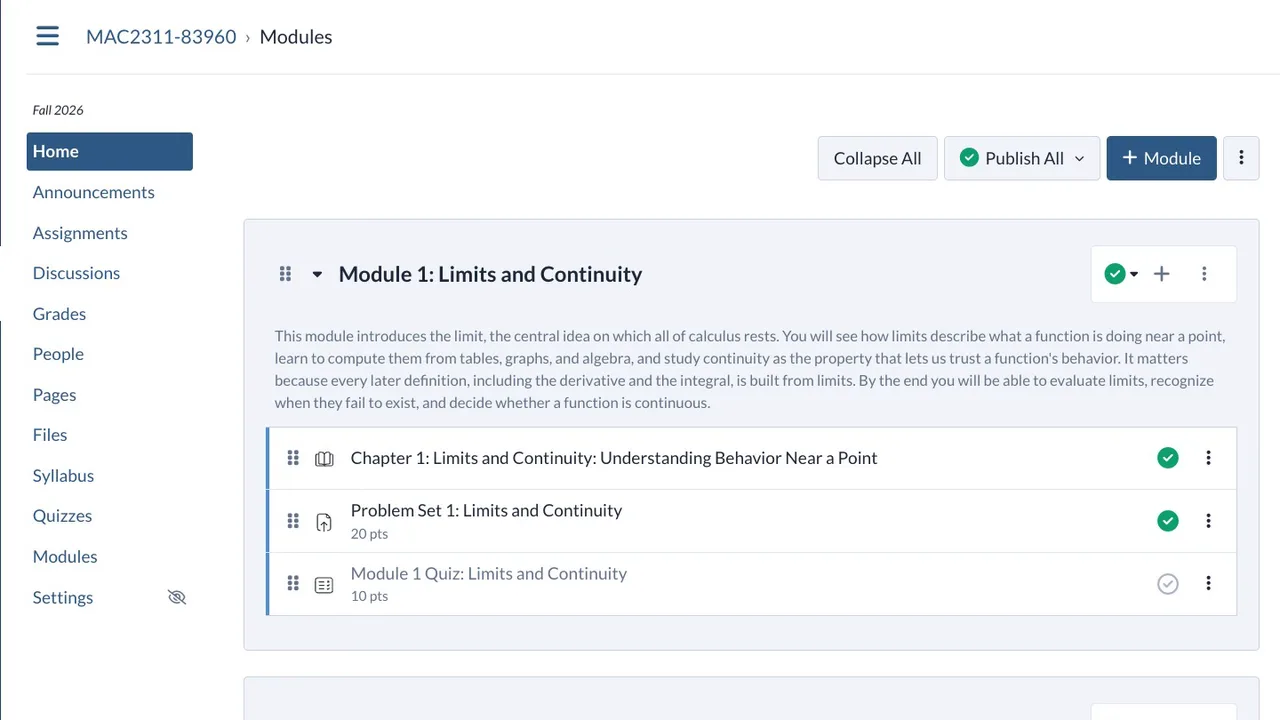
A Calculus I course home in Altair: Module 1 with its chapter, problem set and quiz, in a familiar course menu
Familiar on day one
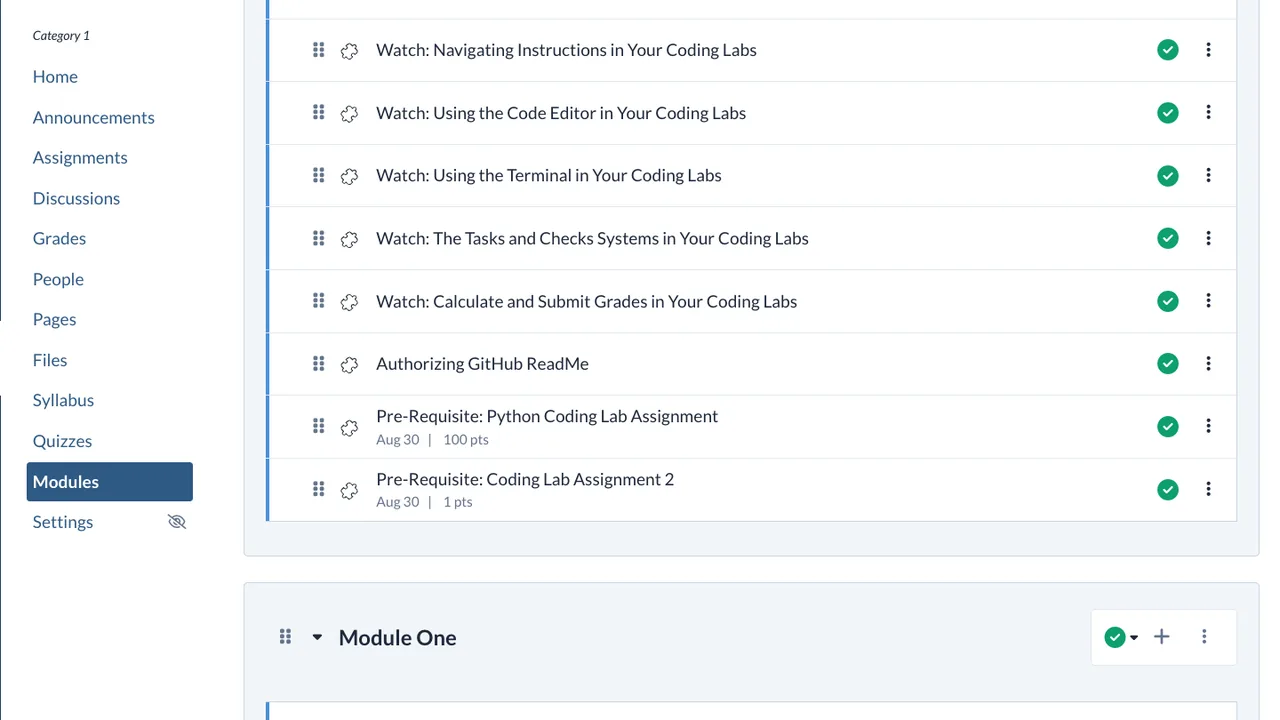
An imported programming course in Altair, its modules and items in their original order
Course rebuilt in about a minute
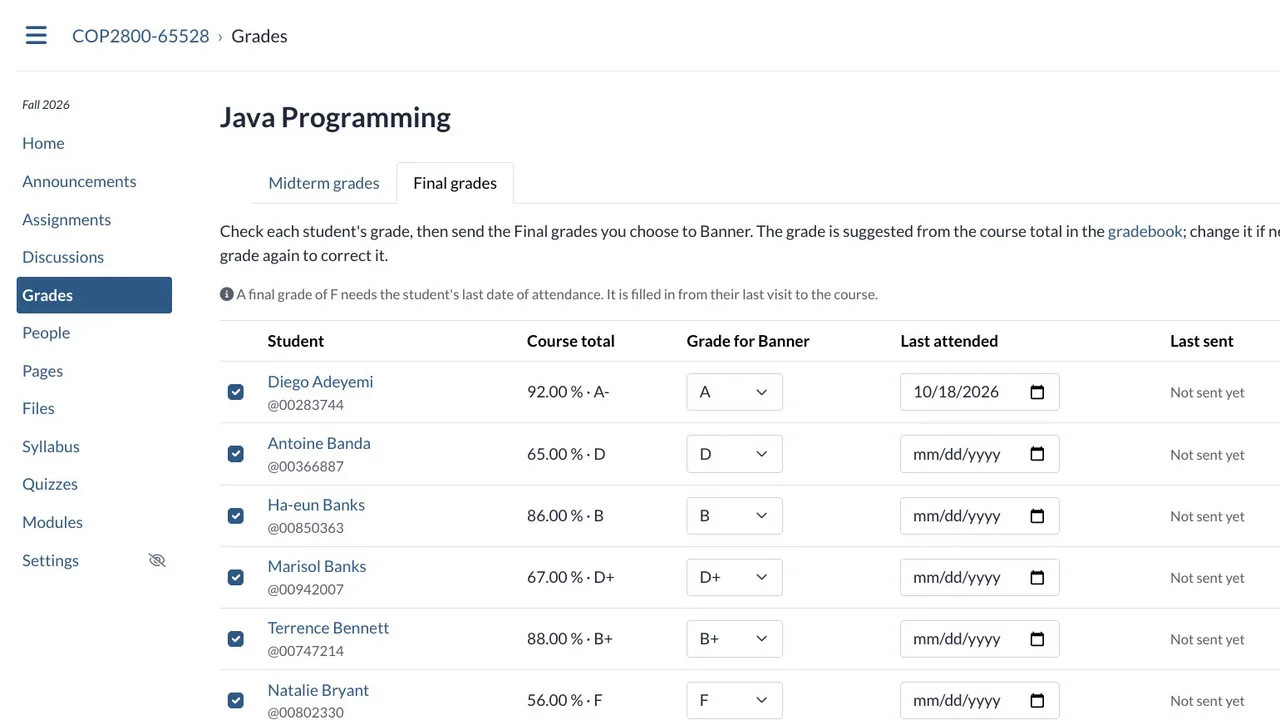
Final grades in Altair: each student’s course total and grade for Banner, ready to send
Sent to Banner when the teacher clicks
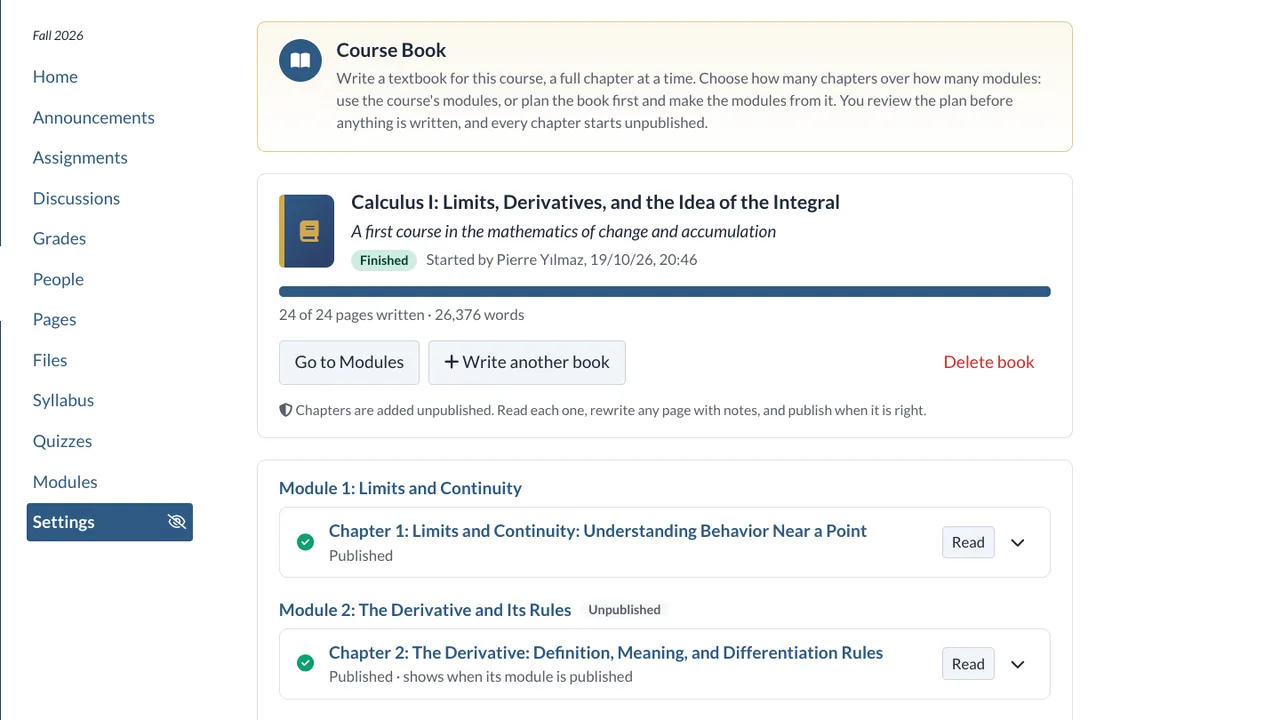
Altair’s Course Book: a finished Calculus I book of four chapters, 26,376 words, added unpublished for review
4 chapters · 26,376 words to review
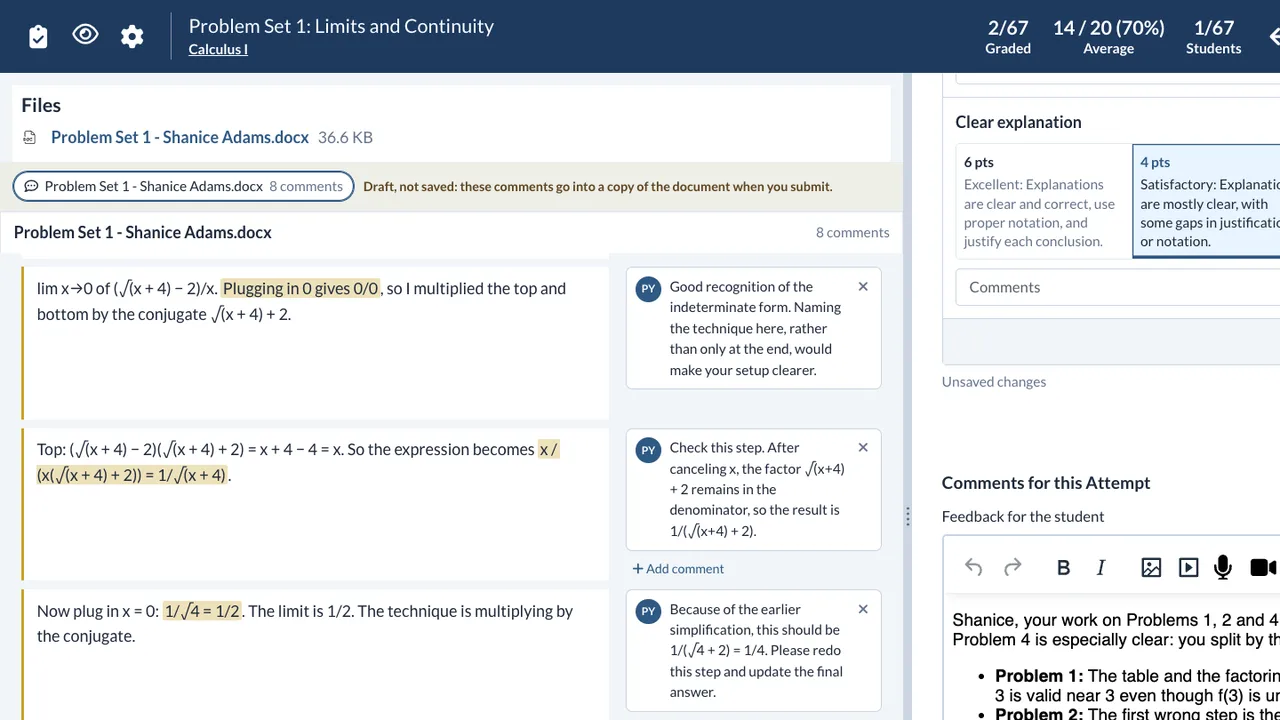
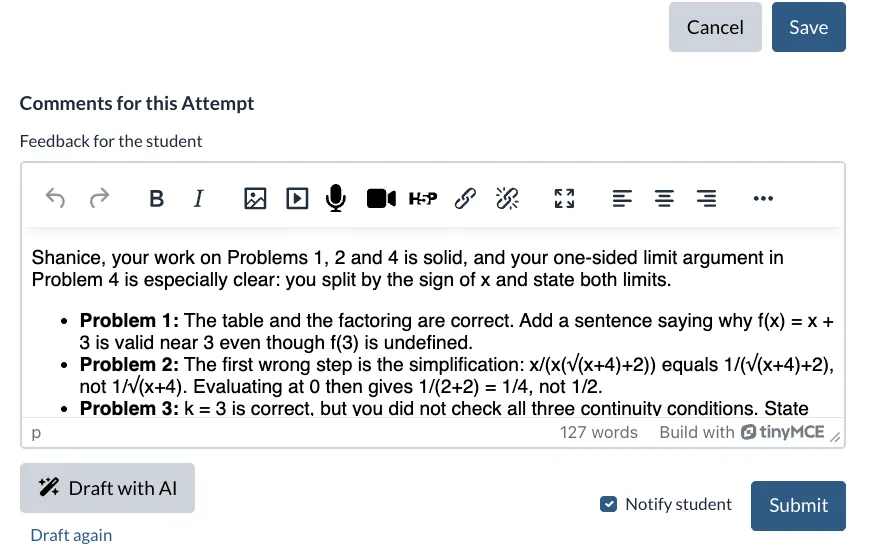
Altair’s Grader: AI margin comments beside a student’s calculus work, marked Draft, not saved, and a suggested rubric rating
8 margin comments · draft, not saved
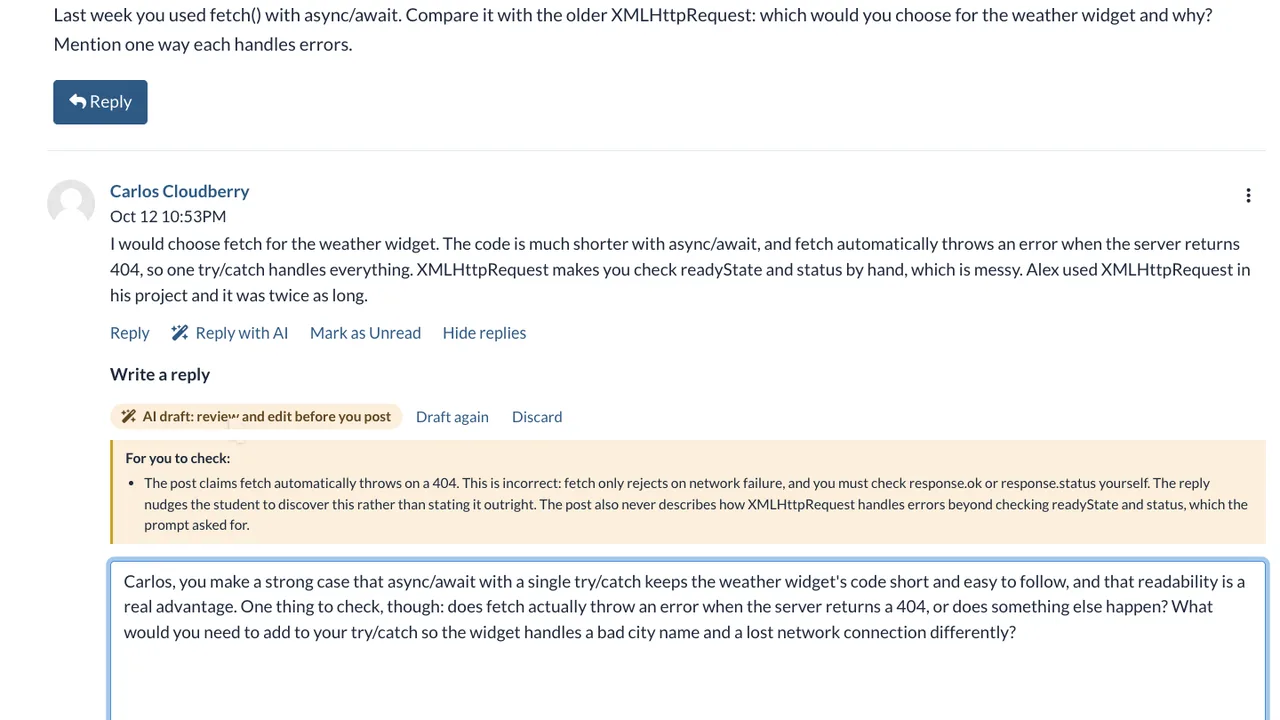
An AI-drafted discussion reply in Altair, with notes for the teacher to check before posting
Drafted for the teacher to check
Six screens from the Altair beta: a course home, an imported course, grades for Banner, a Course Book, the Grader with AI margin comments, and an AI-drafted discussion reply

The video · 2:00

Meet Altair in about two minutes.

Watch on YouTube

Transcript

What the video says, as recorded in November 2026. Where it differs from the product page, the product page is current.

Meet Altair, the learning platform that gives college teachers their time back. It feels like the system your faculty already know, and it has AI built into every part of the course.

Teachers and students feel at home on day one. The dashboard, the modules, the assignments, and the gradebook all work the way they expect. There is nothing new to learn before the first class.

Moving to Altair is easy. A teacher uploads a course export from their current platform, and Altair rebuilds the course in about a minute. Modules, pages, quizzes, files, due dates, and grade weights all come across in the same order.

Altair connects to Banner. Every section becomes a course, and every student gets an account and an enrollment. When a student drops a class, the roster updates within a minute.

Now the fun begins. A teacher describes the course, and the AI writes a complete course book, with worked examples and practice problems. The teacher approves the plan first, and nothing is published until they read it.

The teacher can ask for a problem set in every module, with a rubric, and keep only the changes they like. Quizzes come from the course’s own material, and each question shows the skill it tests.

Grading is where teachers save the most time. One click drafts feedback, suggests rubric ratings, and writes comments in the margin of the student’s paper. The teacher reviews every word, and nothing reaches the student until they submit it.

The AI helps in discussions, too. It drafts thoughtful replies to students, and it writes the weekly welcome post. One announcement can go to every section at once.

At midterm and at the end of the term, grades go back to Banner with one click.

Altair is one platform, from the registrar to the gradebook. The AI does the heavy work, and the teacher stays in charge. Give your faculty their time back with Altair.

Sound familiar?

Two days before the term, a professor rebuilds last spring’s course by hand: re-uploading files, re-linking pages, moving every due date. Add/drop week reshuffles the roster. By midterm, problem sets are waiting for comments, and the AI that could help sits in another tab.

Altair puts the AI inside the course, where the work already happens.

  • Rosters, courses, feedback and grades share one platform.
  • Nothing the AI writes reaches a student until a teacher has read it and sent it.

Features

What Altair does for you.

Familiar on day one

Nothing new to learn before the first class.

The dashboard, modules, assignments, quizzes and gradebook all work the way faculty and students expect. Moving in is easy: upload last term’s course export, and Altair rebuilds it in about a minute.

  • Same layout, same habits. A course menu on the left, Modules as the home page, and a Grader beside the gradebook.
  • Courses arrive intact. Modules, pages, quizzes, files, due dates and grade weights come across in the same order.
  • Dates move with you. Shift every date to the new term, or clear them, as the course comes in.
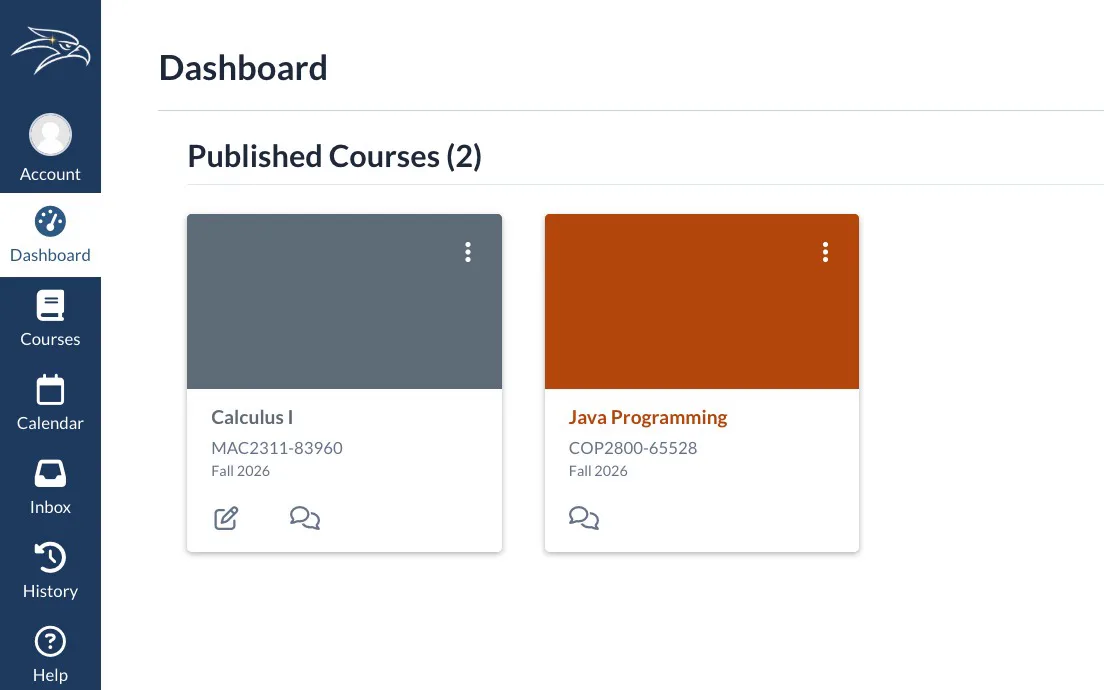
The Altair dashboard: a left rail with Account, Dashboard, Courses, Calendar, Inbox and History, and published course cards for Calculus I and Java Programming

Courses built with AI

A course book, problem sets and quizzes, drafted from your plan.

A teacher describes the course, and the AI writes a complete course book with worked examples and practice problems. The teacher approves every plan first, and everything new starts unpublished.

  • Course Book. Edit the chapter plan, let the AI write in the background, then read, rewrite any page with notes, and publish each chapter.
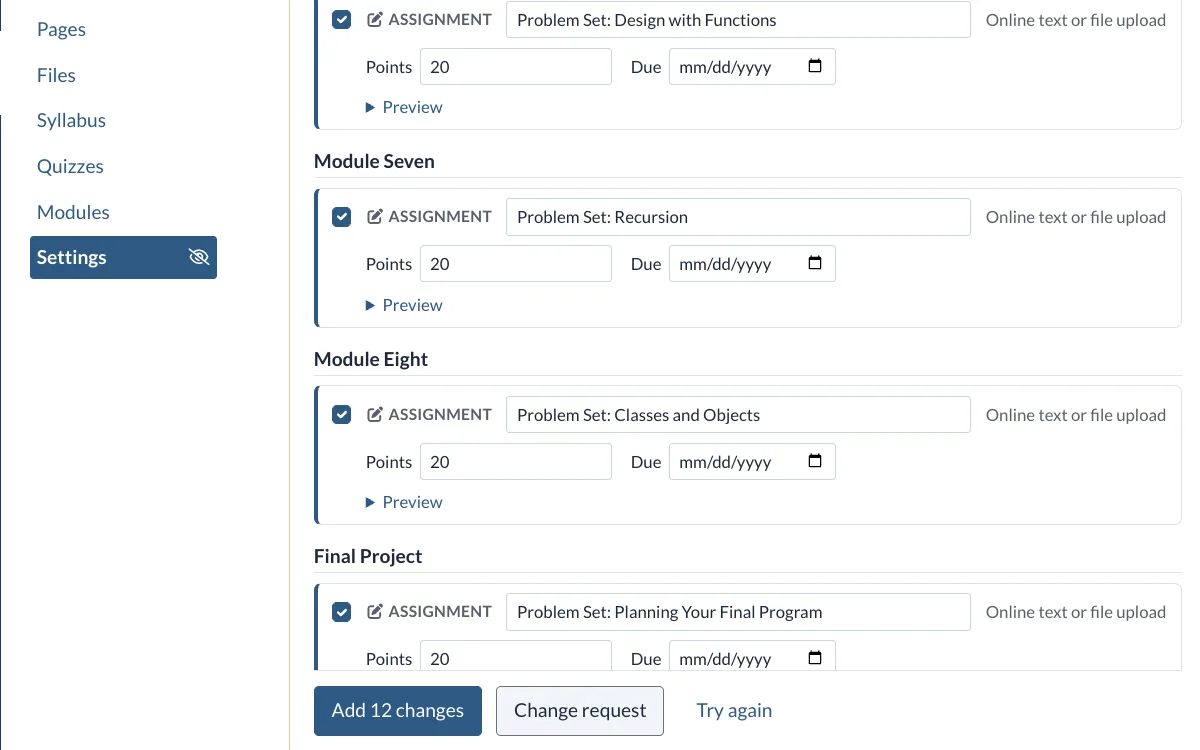
  • Build with AI. Ask for a problem set in every module, with a rubric, and keep only the changes you like. A build can be undone.
  • Quiz with AI. Questions come from the course’s own material, and each one shows its source and the thinking level it tests.
A Build with AI plan in Altair: a 20-point problem set proposed for each module, with an Add 12 changes button

Feedback, drafted

One click drafts the feedback. The teacher decides.

In the Grader, one click drafts feedback, suggests rubric ratings and writes comments in the margin of the student’s paper. The teacher reviews every word, and nothing reaches the student until they submit it.

  • Margin comments in Word. Comments sit beside the paragraphs they are about, in a copy of the student’s own .docx. PDF and text papers get a new Word file.
  • Your instructions. Each assignment carries its own feedback instructions, built from a template, refined with AI or pulled from a saved library.
  • Discussions too. Draft a reply to any student’s post, and get each week’s welcome post drafted a few days before the module opens.
Altair’s Grader with AI-drafted feedback in the comments box, a Draft with AI button and a Submit button

The full toolkit

Everything inside Altair.

Five categories. Open one to see every tool by name.

AI for building courses

6 tools
  • Course Book
  • Build with AI
  • Create a quiz with AI
  • Add questions with AI
  • Rewrite a question with AI
  • Rewrite a chapter page with notes

AI for feedback and grading

8 tools
  • Feedback drafts in the Grader
  • Suggested rubric ratings
  • Margin comments in Word files
  • Feedback drafts for graded discussions
  • Feedback instructions from templates
  • Refine with AI
  • Saved instruction library
  • Accuracy double-check

AI for discussions and announcements

5 tools
  • Reply with AI
  • Draft with AI in the reply box
  • Welcome post with AI
  • Scheduled weekly welcome drafts
  • One announcement to all your sections

The LMS faculty already know

16 features
  • Dashboard
  • Modules
  • Assignments
  • Discussions
  • Announcements
  • Pages
  • Files
  • Syllabus
  • Quizzes
  • People
  • Gradebook
  • Grader
  • Student grades with What-If
  • Calendar
  • Inbox
  • Student View

For the institution

6 tools
  • Banner sync: sections, accounts, enrollments
  • Midterm and final grades to Banner
  • Course import (.imscc exports)
  • Course AI switch and feature switches
  • Course AI credit limits and meters
  • A hosted instance of your own

How it works

Altair in four steps.

  1. An Altair sign-in page for a college

    Step 1: We host your instance

    Your college gets its own Altair, with its own database and web address. We run it and keep it up to date.

  2. Altair’s Banner sync status with recent successful syncs

    Step 2: Connect Banner

    Terms, sections, faculty and students come in from Banner, and adds and drops apply every minute.

  3. A completed course import in Altair listing the modules, pages and files it brought in

    Step 3: Bring your courses

    Faculty upload last term’s course exports. Modules, pages, quizzes and grade weights arrive in order.

  4. Altair’s AI settings for a course: feature switches and a credit meter

    Step 4: Set the AI limits

    The school sets AI caps. Teachers set limits for their own courses and choose which AI features to use.

From the registrar to the gradebook

Automatic where it helps. Yours where it counts.

Altair handles the routine work of a term on its own. Anything a student will see, and every grade, waits for a teacher.
  1. Before the term

    Altair:With Banner connected, turns its sections into courses, enrolls every student, and rebuilds last term’s course from its export.

    The teacher:Shifts the dates to the new term, or clears them, and publishes the course when it is ready.

  2. Building

    Altair:Drafts a course book, problem sets with rubrics, and quizzes from the course’s own material.

    The teacher:Approves the plan first, keeps the changes they like, and publishes each piece. Everything starts unpublished.

  3. Every week

    Altair:Applies adds and drops within a minute, and drafts each module’s welcome post a few days before it opens.

    The teacher:Approves, edits or skips each post. Nothing is posted without that click.

  4. Grading

    Altair:Drafts feedback, suggests rubric ratings and writes margin comments, one student at a time.

    The teacher:Starts each draft, reviews every word and submits. The AI never sets a grade.

  5. Midterm and final

    Altair:Keeps each roster in step with Banner, so a dropped student shows as Dropped.

    The teacher:Sends midterm and final grades to Banner with one click. Nothing goes until they do.

The limits are yours, too. The school sets AI caps, teachers set limits for their own courses, and AI can be switched off for a course or for a single feature.

Trust

What you can count on.

  • AI drafts. You decide.

    Teachers start feedback drafts one student at a time and review every word. Nothing reaches a student until the teacher submits it, and the AI never sets a grade.

  • Limits you control

    The school sets AI caps and teachers set limits within them. AI can be switched off for a whole course or for a single feature.

  • An instance of your own

    Each institution runs its own Altair, with its own database and web address, kept apart from every other college.

Works with

  • Banner (beta connector)
  • Course exports (.imscc)
  • Word and PDF files

Pricing

Bring Altair to your institution.

Priced per institution

Altair is in beta. Every college gets its own hosted instance, and the school pays for AI use within the caps it sets. Talk to us about what fits your campus.

  • Your own hosted instance, database and web address
  • Banner sync and course import
  • AI features with school and course limits
Request a demo

FAQ

Questions, answered.

Still curious? Talk to us

What is Altair?

Altair is a learning management system for colleges and universities. It works the way faculty and students already expect an LMS to work, and it has AI built into course building, feedback and discussions. The AI drafts; the teacher reviews and decides.

Altair is in beta today. Request a demo to see it on a live course.

Will our faculty need retraining?

Very little. The dashboard, modules, assignments, discussions, quizzes and gradebook sit where faculty and students expect them, so there is nothing new to learn before the first class.

Can we bring our existing courses?

Yes. A teacher uploads a course export (.imscc) from their current platform, and Altair rebuilds it in the background in about a minute: modules, pages, assignments and rubrics, discussions, announcements, quizzes and question banks, files, gradebook groups and weights, the syllabus and internal links. Dates can be shifted to the new term or removed.

Does Altair work with Banner?

Yes. Altair reads terms, sections, faculty, students and registrations from Banner, applies changes every minute and runs a full sync each night. A dropped or withdrawn student is suspended in the course. At midterm and at the end of the term, teachers send grades back to Banner with one click.

During the beta the connector runs against a full Banner-style test college; connecting your campus means giving it your Banner address and key.

Does the AI grade students?

No. The AI drafts feedback, suggests rubric ratings and writes margin comments, but it never sets a grade. Each draft is started by the teacher for one student, and nothing is saved or released until the teacher submits it. There is no “draft all” button, by design.

Who controls how much AI gets used?

You do. The school sets AI caps, and teachers set limits within them. Each course has an AI switch, a switch for every AI feature, credit meters and a credit limit. When credits run out, Altair says so and waits; nothing runs past the limit.

Do students know when AI helped?

Yes. A discussion reply posted from an AI draft is marked AI-assisted, and students see “AI helped draft this feedback” under any grade where it did.

How is Altair hosted and priced?

We host it. Each institution gets its own Altair instance, with its own database and web address, so one college can be upgraded, backed up or restored without touching another.

Altair is priced per institution, and AI use is billed to the school within the caps it sets. Request a demo and we will talk through what fits your college.

Give your faculty their time back.

Request a demo

Bringing Altair to your college? Talk to us